Dieser Post setzt den sechzehnten Teil fort. Statische Architekturdiagramme zeigen Struktur. Sequenzdiagramme zeigen Verhalten — wer spricht wen in welcher Reihenfolge an. Bausteinsicht nennt das Dynamic Views.
Dynamic Views im Modell
Dynamic Views werden als Array dynamicViews in architecture.jsonc definiert:
{
  "dynamicViews": [
    {
      "key":         "checkout-flow",
      "title":       "Checkout-Flow",
      "description": "Ablauf eines erfolgreichen Bestellvorgangs",
      "steps": [
        { "index": 1, "from": "shop.frontend", "to": "shop.api",       "label": "POST /orders",      "type": "sync" },
        { "index": 2, "from": "shop.api",      "to": "authservice",    "label": "validate token",    "type": "sync" },
        { "index": 3, "from": "authservice",   "to": "shop.api",       "label": "200 OK",            "type": "return" },
        { "index": 4, "from": "shop.api",      "to": "paymentservice", "label": "charge(amount)",    "type": "sync" },
        { "index": 5, "from": "paymentservice","to": "shop.db",        "label": "INSERT payment",    "type": "sync" },
        { "index": 6, "from": "shop.api",      "to": "shop.db",        "label": "INSERT order",      "type": "sync" },
        { "index": 7, "from": "shop.api",      "to": "eventbus",       "label": "order.created",     "type": "async" },
        { "index": 8, "from": "shop.api",      "to": "shop.frontend",  "label": "201 Created",       "type": "return" }
      ]
    },
    {
      "key":   "auth-refresh",
      "title": "Token-Refresh-Flow",
      "steps": [
        { "index": 1, "from": "shop.frontend", "to": "authservice", "label": "POST /refresh", "type": "sync" },
        { "index": 2, "from": "authservice",   "to": "shop.frontend","label": "new JWT",       "type": "return" }
      ]
    }
  ]
}
Schritt-Typen
| Typ | Darstellung |
|---|---|
| Durchgehender Pfeil (synchroner Aufruf) |
| Gestrichelter Pfeil (Nachricht / Event) |
| Gepunkteter Rückgabepfeil |
bausteinsicht export-sequence
# Alle Dynamic Views als PlantUML exportieren (Standard)
bausteinsicht export-sequence

# Als Mermaid
bausteinsicht export-sequence --diagram-format mermaid

# Nur eine bestimmte View
bausteinsicht export-sequence --view checkout-flow

# In Verzeichnis schreiben
bausteinsicht export-sequence --output docs/sequences/
Ausgabe (PlantUML, checkout-flow.puml):
@startuml checkout-flow
title Checkout-Flow

participant "shop.frontend" as shop_frontend
participant "shop.api" as shop_api
participant "authservice" as authservice
participant "paymentservice" as paymentservice
participant "shop.db" as shop_db
participant "eventbus" as eventbus

shop_frontend -> shop_api : POST /orders
shop_api -> authservice : validate token
authservice --> shop_api : 200 OK
shop_api -> paymentservice : charge(amount)
paymentservice -> shop_db : INSERT payment
shop_api -> shop_db : INSERT order
shop_api ->> eventbus : order.created
shop_api --> shop_frontend : 201 Created
@enduml
Ausgabe (Mermaid, checkout-flow.md):
sequenceDiagram
    title Checkout-Flow
    shop.frontend->>shop.api: POST /orders
    shop.api->>authservice: validate token
    authservice-->>shop.api: 200 OK
    shop.api->>paymentservice: charge(amount)
    paymentservice->>shop.db: INSERT payment
    shop.api->>shop.db: INSERT order
    shop.api-)eventbus: order.created
    shop.api-->>shop.frontend: 201 Created
In Dokumentation einbetten
PlantUML lässt sich direkt in AsciiDoc referenzieren:
\[plantuml, checkout-flow, svg]include::sequences/checkout-flow.puml[]
Mermaid funktioniert direkt in GitHub-Markdown und in Wikis.
Unterschied zu statischen Views
| Aspekt | Statische View (Teil 5) | Dynamic View |
|---|---|---|
Zeigt | Welche Elemente existieren | Wer kommuniziert in welcher Reihenfolge |
Format | draw.io-Diagramm | PlantUML / Mermaid |
Gut für | Strukturübersicht | Ablaufdokumentation, API-Beschreibung |
Die Elemente in steps müssen nicht in einer statischen View sichtbar sein — sie müssen nur im model existieren. bausteinsicht validate prüft alle from/to-Referenzen in Dynamic Views. |
Beispiel-Modell
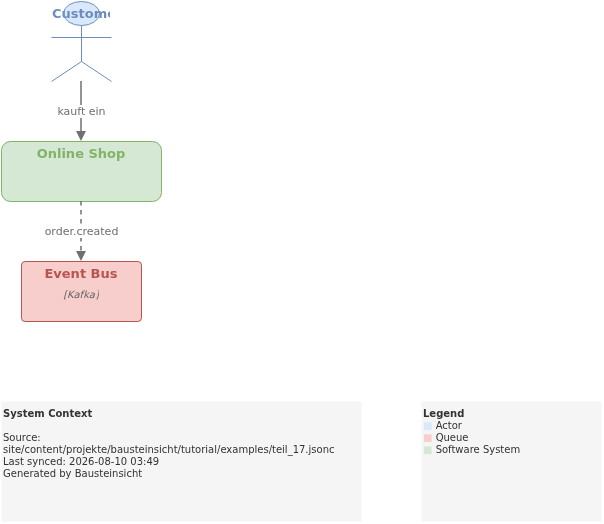
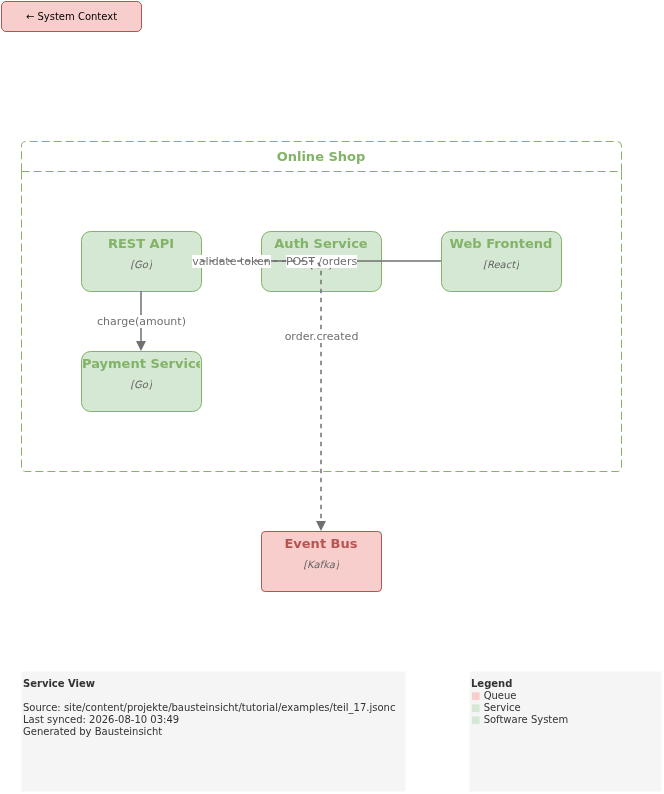
Das Beispiel für diesen Teil (Modell mit dynamicViews für den Checkout-Flow) liegt unter teil_17.jsonc.
So sieht das Ergebnis in draw.io aus (bausteinsicht sync):
Das draw.io-File dafür findest du hier: teil_17.drawio
Generierte PNG-Dateien via bausteinsicht export --image-format png:
Generiertes PlantUML-Diagramm (statische Sicht) via bausteinsicht export-diagram:
Was als nächstes kommt
Teil 18: CLI-Modellierung — Elemente, Beziehungen und Views direkt per Kommandozeile hinzufügen
Teil 19: Health Score — Architekturqualität mit A–F bewerten
Offizielle Dokumentation: User Manual · Tutorial auf doctoolchain.org