Dieser Post baut direkt auf Teil 29 auf. Das Big Bank Example hat 3 Views erzeugt: System Context, Container, Components. Das reicht für eine Dokumentationsseite — aber nicht für ein reales Projekt.
Ein Security-Architect braucht ein anderes Diagramm als ein Mobile-Entwickler. Ein Manager sieht gern die Kundenperspektive, kein Backend. Alle drei wollen aber aus demselben Modell schöpfen — nicht drei separate Dateien pflegen.
Dieses Kapitel zeigt wie.
Das Problem: eine View für alle
Wenn alle Elemente in einer View landen, passiert das:
20+ Shapes in einem Diagramm — niemand kann es auf einen Blick erfassen
Jede Änderung betrifft das einzige Diagramm — alle Stakeholder müssen sich damit auseinandersetzen
Keine klare Aussage: "was will dieses Diagramm zeigen?"
Das Big Bank Example hat 3 Akteure, 4 Systeme, 5 Container, 6 Komponenten. In einer einzigen "alles"-View wären das 18 Shapes — schon zu viel.
Die Lösung: ein Modell, viele Views
Bausteinsicht trennt Modell (was existiert) von Views (was gezeigt wird).
// Modell: einmal definieren
"model": { ... },
"relationships": [ ... ],

// Views: beliebig viele Linsen auf dasselbe Modell
"views": {
  "context":            { ... },   // für Management
  "containers":         { ... },   // für Architekten
  "components":         { ... },   // für alle Entwickler
  "api-internals":      { ... },   // für Backend-Team
  "mobile-flow":        { ... },   // für Mobile-Entwickler
  "customer-touchpoints": { ... }, // für Product Owner
  "security-flow":      { ... }    // für Security-Team
}
Jede View erzeugt einen eigenen Tab in architecture.drawio — also ein eigenes Diagramm.
Das Modell bleibt genau einmal vorhanden.
Faustregel: wann braucht man eine neue View?
| Signal | Reaktion |
|---|---|
Ein Diagramm hat mehr als 12–15 Shapes | Aufteilen in fokussierte Views |
Verschiedene Teams fragen nach unterschiedlichen Ausschnitten | Pro Team eine View |
Ein Diagramm zeigt zu viel Kontext für seinen Zweck |
|
Meetings: "kannst du kurz die Auth-Flows zeigen?" | Eigene |
Jemand fragt: "was sieht der Kunde?" | Eigene |
Die 4 neuen Views im Detail
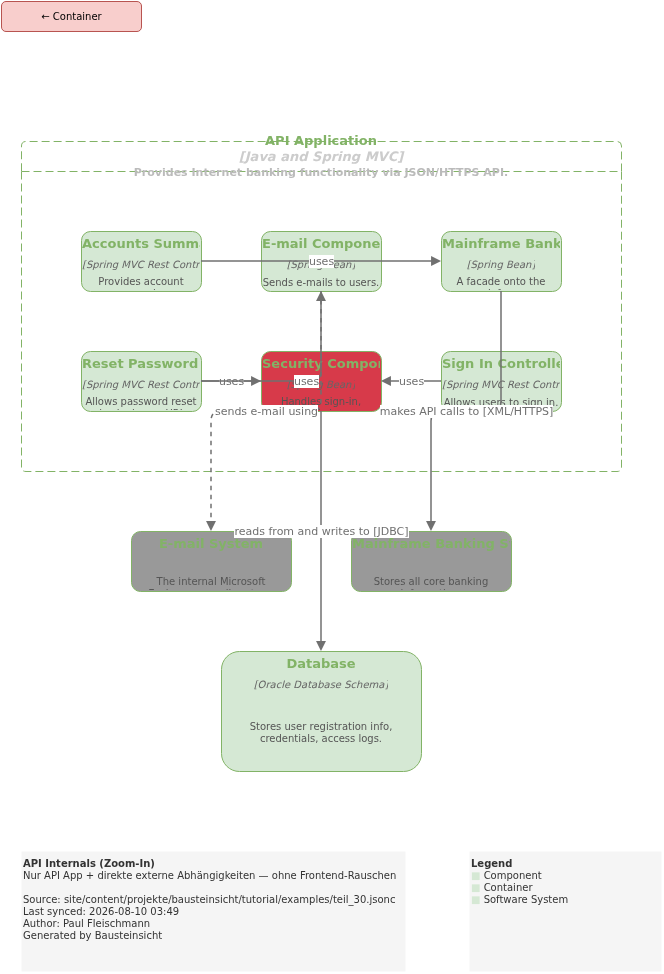
api-internals — Zoom-In ohne Frontend-Rauschen
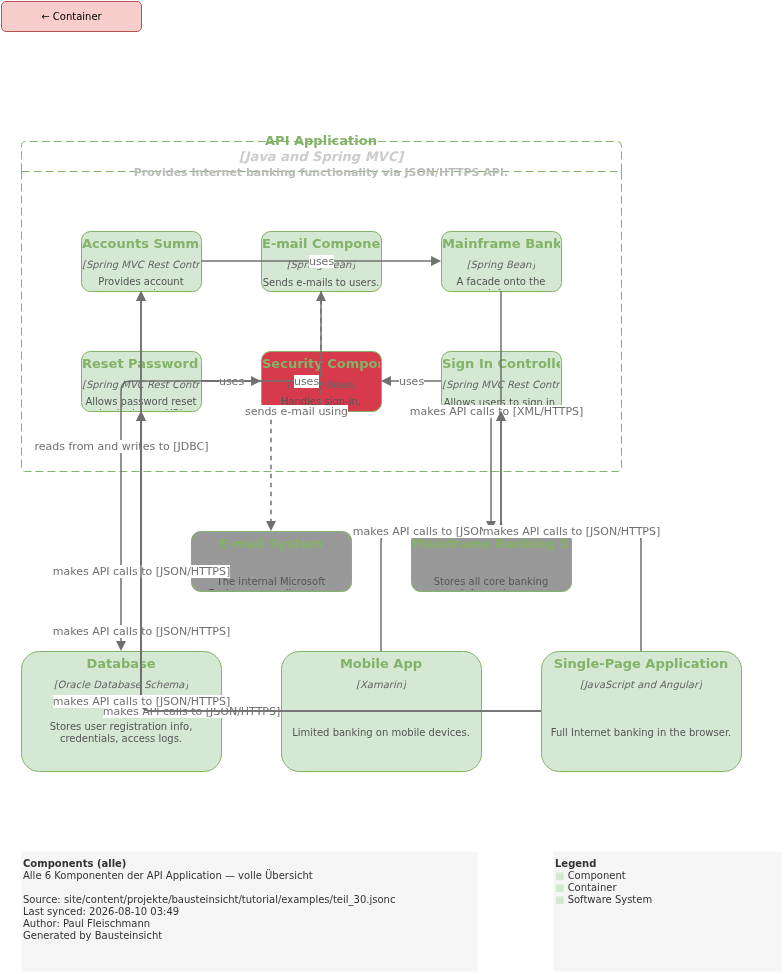
Die Standard components-View zeigt SPA und Mobile App als Aufrufer der Komponenten.
Das ist korrekt — aber für das Backend-Team ist das Rauschen.
Sie wollen sehen wie die 6 Komponenten untereinander und mit externen Systemen interagieren.
"api-internals": {
  "title": "API Internals (Zoom-In)",
  "description": "Nur API App + direkte externe Abhängigkeiten — ohne Frontend-Rauschen",
  "scope": "internet-banking.api-app",
  "include": [
    "internet-banking.api-app.*",
    "internet-banking.database",
    "mainframe",
    "email"
  ]
}
Kein customer, kein spa, kein mobile-app — nur die 6 Komponenten, Database, Mainframe und E-Mail.
Der Unterschied zu components: kein Frontend in der View.
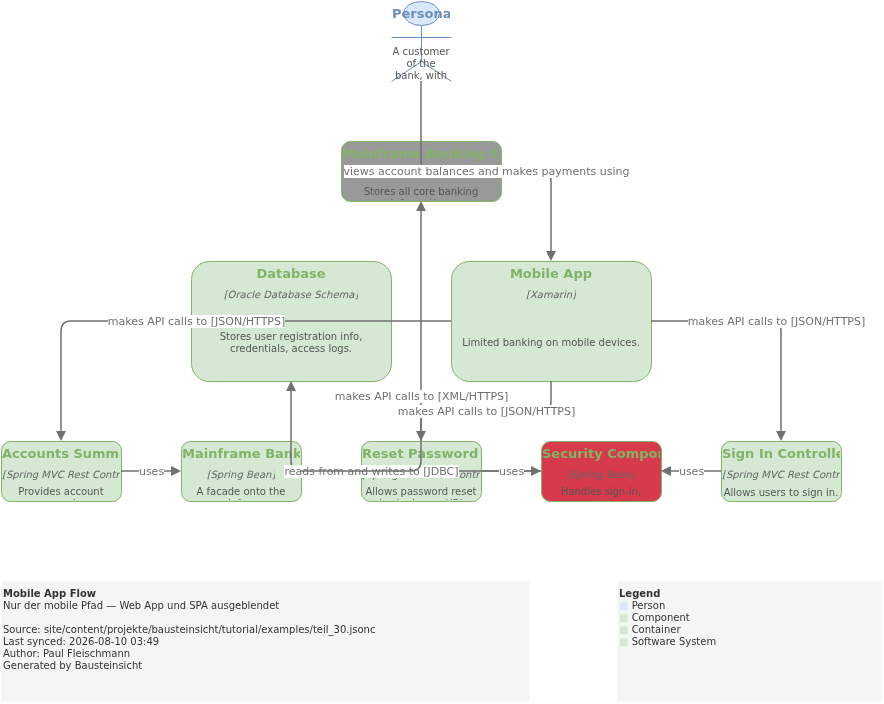
mobile-flow — nur der mobile Pfad
Web App und SPA sind für mobile Entwickler irrelevant.
Diese View zeigt den kompletten Pfad von customer über mobile-app bis zu den relevanten Komponenten und externen Systemen:
"mobile-flow": {
  "title": "Mobile App Flow",
  "description": "Nur der mobile Pfad — Web App und SPA ausgeblendet",
  "include": [
    "customer",
    "internet-banking.mobile-app",
    "internet-banking.api-app.sign-in",
    "internet-banking.api-app.accounts-summary",
    "internet-banking.api-app.reset-password",
    "internet-banking.api-app.security",
    "internet-banking.api-app.mainframe-facade",
    "internet-banking.database",
    "mainframe"
  ]
}
|
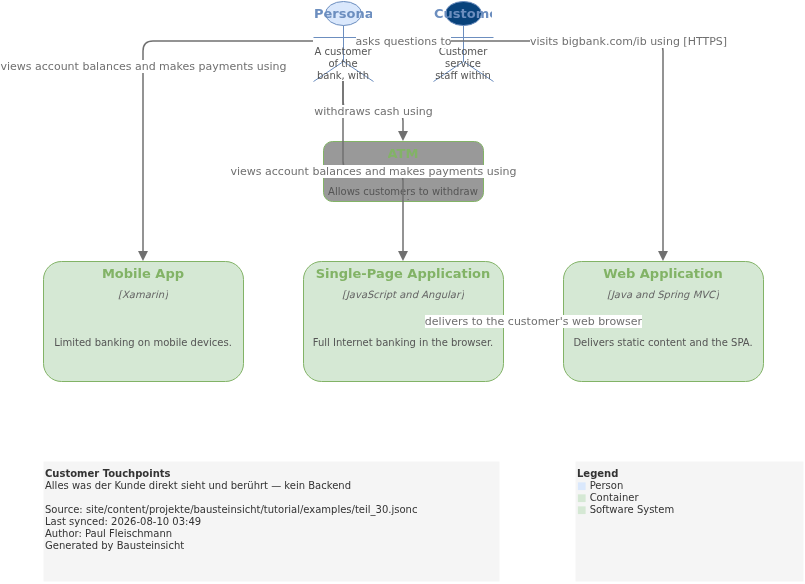
customer-touchpoints — was der Kunde sieht
Product Owner und UX-Designer fragen: "wo interagiert der Kunde mit dem System?" Diese View zeigt genau das — kein Backend, keine API Application:
"customer-touchpoints": {
  "title": "Customer Touchpoints",
  "description": "Alles was der Kunde direkt sieht und berührt — kein Backend",
  "include": [
    "customer",
    "internet-banking.web-app",
    "internet-banking.spa",
    "internet-banking.mobile-app",
    "atm",
    "support-staff"
  ]
}
Nur 6 Shapes. Auf einen Blick verständlich — auch für Nicht-Techniker.
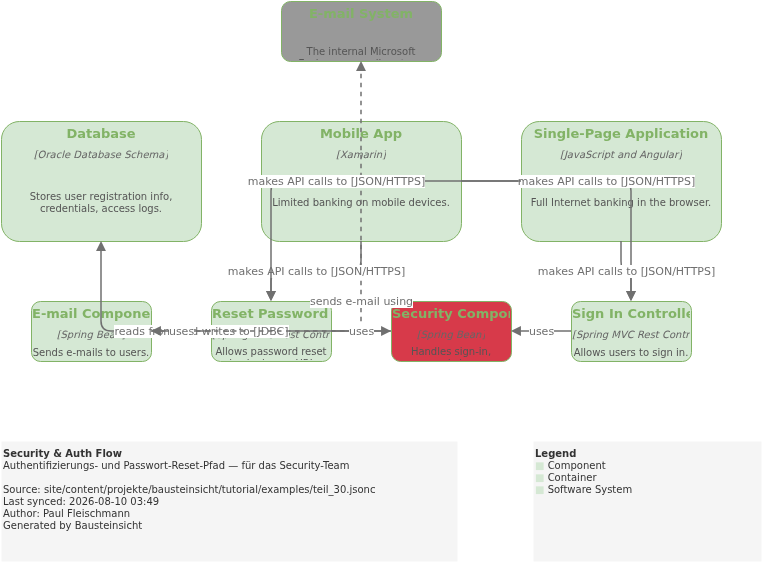
security-flow — Auth und Passwort-Reset
Security-Reviews brauchen den Authentifizierungspfad isoliert: wer ruft den Sign-In Controller auf, wo liegt die Datenbank, welche Komponente sendet E-Mails?
"security-flow": {
  "title": "Security & Auth Flow",
  "description": "Authentifizierungs- und Passwort-Reset-Pfad — für das Security-Team",
  "include": [
    "internet-banking.spa",
    "internet-banking.mobile-app",
    "internet-banking.api-app.sign-in",
    "internet-banking.api-app.reset-password",
    "internet-banking.api-app.security",
    "internet-banking.api-app.email-component",
    "internet-banking.database",
    "email"
  ]
}
accounts-summary und mainframe-facade sind hier bewusst ausgeblendet — sie spielen im Auth-Flow keine Rolle.
Views und Relationship Lifting
Eine wichtige Eigenschaft: wenn eine View Komponenten zeigt, aber deren Parent-Container nicht, hebt Bausteinsicht die Beziehungen automatisch an.
In der customer-touchpoints View ist internet-banking.spa direkt sichtbar.
Die Beziehung customer → internet-banking.spa wird direkt gezeichnet — nicht hochgehoben.
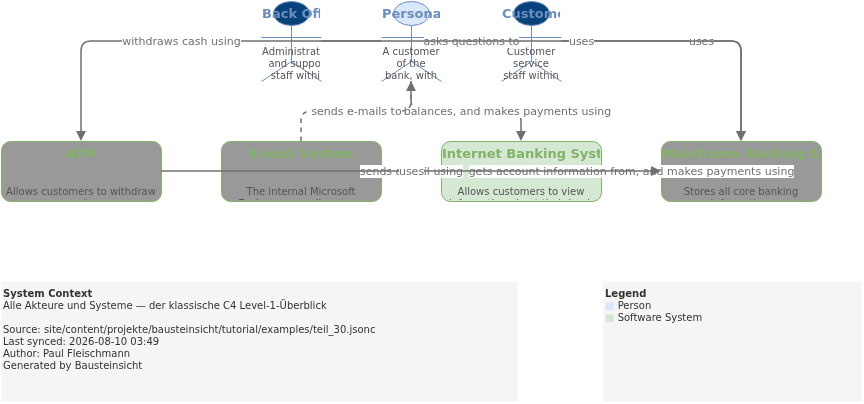
In der context View ist nur internet-banking sichtbar (kein spa).
Alle Beziehungen von customer zu internet-banking.* werden zu einer einzigen Linie
customer → internet-banking zusammengefasst.
Dasselbe Modell, automatisch auf die richtige Abstraktionsebene gehoben — ohne manuelle Doppel-Definitionen.
Das vollständige teil_30.jsonc
{
  // Teil 30: Mehr Views aus einem Modell — dasselbe Big Bank Modell wie Teil 29,
  // aber mit 7 fokussierten Views statt 3.
  "$schema": "https://raw.githubusercontent.com/docToolchain/Bausteinsicht/main/schemas/bausteinsicht.schema.json",
  "config": {
    "author": "Paul Fleischmann",
    "metadata": true,
    "legend": true
  },
  "specification": {
    "elements": {
      "actor":     { "notation": "Person" },
      "system":    { "notation": "Software System", "container": true },
      "container": { "notation": "Container",        "container": true },
      "component": { "notation": "Component",        "container": true }
    },
    "relationships": {
      "uses":  { "notation": "uses" },
      "sends": { "notation": "sends", "dashed": true }
    },
    "tags": [
      { "id": "external",    "description": "Existing System",     "style": { "fillColor": "#999999", "fontColor": "#ffffff" } },
      { "id": "bank-staff",  "description": "Bankmitarbeiter",     "style": { "fillColor": "#08427b", "fontColor": "#ffffff" } },
      { "id": "web-browser", "description": "Läuft im Browser" },
      { "id": "mobile",      "description": "Läuft auf Mobilgerät" },
      { "id": "database",    "description": "Datenbank" },
      { "id": "security",    "description": "Security-Komponente", "style": { "fillColor": "#d73a4a", "fontColor": "#ffffff" } }
    ]
  },
  "model": {
    "customer":       { "kind": "actor",  "title": "Personal Banking Customer",  "description": "A customer of the bank, with personal bank accounts." },
    "support-staff":  { "kind": "actor",  "title": "Customer Service Staff",     "description": "Customer service staff within the bank.", "tags": ["bank-staff"] },
    "backoffice":     { "kind": "actor",  "title": "Back Office Staff",           "description": "Administration and support staff within the bank.", "tags": ["bank-staff"] },

    "mainframe":      { "kind": "system", "title": "Mainframe Banking System",   "description": "Stores all core banking information.", "tags": ["external"] },
    "email":          { "kind": "system", "title": "E-mail System",              "description": "The internal Microsoft Exchange e-mail system.", "tags": ["external"] },
    "atm":            { "kind": "system", "title": "ATM",                        "description": "Allows customers to withdraw cash.", "tags": ["external"] },

    "internet-banking": {
      "kind": "system", "title": "Internet Banking System",
      "description": "Allows customers to view information about their bank accounts, and make payments.",
      "status": "deployed",
      "children": {
        "web-app":    { "kind": "container", "title": "Web Application",          "technology": "Java and Spring MVC",      "description": "Delivers static content and the SPA.", "status": "deployed" },
        "spa":        { "kind": "container", "title": "Single-Page Application",  "technology": "JavaScript and Angular",   "description": "Full Internet banking in the browser.", "status": "deployed", "tags": ["web-browser"] },
        "mobile-app": { "kind": "container", "title": "Mobile App",               "technology": "Xamarin",                  "description": "Limited banking on mobile devices.", "status": "deployed", "tags": ["mobile"] },
        "api-app": {
          "kind": "container", "title": "API Application", "technology": "Java and Spring MVC",
          "description": "Provides Internet banking functionality via JSON/HTTPS API.",
          "status": "deployed",
          "children": {
            "sign-in":        { "kind": "component", "title": "Sign In Controller",              "technology": "Spring MVC Rest Controller", "description": "Allows users to sign in." },
            "accounts-summary":{ "kind": "component", "title": "Accounts Summary Controller",    "technology": "Spring MVC Rest Controller", "description": "Provides account summaries." },
            "reset-password": { "kind": "component", "title": "Reset Password Controller",      "technology": "Spring MVC Rest Controller", "description": "Allows password reset via single-use URL." },
            "security":       { "kind": "component", "title": "Security Component",             "technology": "Spring Bean",               "description": "Handles sign-in, password changes.", "tags": ["security"] },
            "mainframe-facade":{ "kind": "component", "title": "Mainframe Banking System Facade","technology": "Spring Bean",               "description": "A facade onto the mainframe." },
            "email-component":{ "kind": "component", "title": "E-mail Component",              "technology": "Spring Bean",               "description": "Sends e-mails to users." }
          }
        },
        "database": { "kind": "container", "title": "Database", "technology": "Oracle Database Schema", "description": "Stores user registration info, credentials, access logs.", "status": "deployed", "tags": ["database"] }
      }
    }
  },

  "relationships": [
    { "from": "customer",       "to": "internet-banking",         "label": "views account balances, and makes payments using", "kind": "uses" },
    { "from": "customer",       "to": "support-staff",            "label": "asks questions to",                               "kind": "uses" },
    { "from": "customer",       "to": "atm",                      "label": "withdraws cash using",                            "kind": "uses" },
    { "from": "support-staff",  "to": "mainframe",                "label": "uses",                                            "kind": "uses" },
    { "from": "backoffice",     "to": "mainframe",                "label": "uses",                                            "kind": "uses" },
    { "from": "atm",            "to": "mainframe",                "label": "uses",                                            "kind": "uses" },
    { "from": "internet-banking","to": "mainframe",               "label": "gets account information from, and makes payments using", "kind": "uses" },
    { "from": "internet-banking","to": "email",                   "label": "sends e-mail using",                              "kind": "sends" },
    { "from": "email",          "to": "customer",                 "label": "sends e-mails to",                                "kind": "sends" },

    { "from": "customer",                    "to": "internet-banking.web-app",    "label": "visits bigbank.com/ib using [HTTPS]",             "kind": "uses" },
    { "from": "customer",                    "to": "internet-banking.spa",        "label": "views account balances and makes payments using",  "kind": "uses" },
    { "from": "customer",                    "to": "internet-banking.mobile-app", "label": "views account balances and makes payments using",  "kind": "uses" },
    { "from": "internet-banking.web-app",    "to": "internet-banking.spa",        "label": "delivers to the customer's web browser",          "kind": "uses" },

    { "from": "internet-banking.spa",        "to": "internet-banking.api-app.sign-in",         "label": "makes API calls to [JSON/HTTPS]", "kind": "uses" },
    { "from": "internet-banking.spa",        "to": "internet-banking.api-app.accounts-summary","label": "makes API calls to [JSON/HTTPS]", "kind": "uses" },
    { "from": "internet-banking.spa",        "to": "internet-banking.api-app.reset-password",  "label": "makes API calls to [JSON/HTTPS]", "kind": "uses" },
    { "from": "internet-banking.mobile-app", "to": "internet-banking.api-app.sign-in",         "label": "makes API calls to [JSON/HTTPS]", "kind": "uses" },
    { "from": "internet-banking.mobile-app", "to": "internet-banking.api-app.accounts-summary","label": "makes API calls to [JSON/HTTPS]", "kind": "uses" },
    { "from": "internet-banking.mobile-app", "to": "internet-banking.api-app.reset-password",  "label": "makes API calls to [JSON/HTTPS]", "kind": "uses" },

    { "from": "internet-banking.api-app.sign-in",         "to": "internet-banking.api-app.security",         "label": "uses", "kind": "uses" },
    { "from": "internet-banking.api-app.accounts-summary","to": "internet-banking.api-app.mainframe-facade",  "label": "uses", "kind": "uses" },
    { "from": "internet-banking.api-app.reset-password",  "to": "internet-banking.api-app.security",         "label": "uses", "kind": "uses" },
    { "from": "internet-banking.api-app.reset-password",  "to": "internet-banking.api-app.email-component",  "label": "uses", "kind": "uses" },
    { "from": "internet-banking.api-app.security",        "to": "internet-banking.database",                 "label": "reads from and writes to [JDBC]",  "kind": "uses" },
    { "from": "internet-banking.api-app.mainframe-facade","to": "mainframe",                                 "label": "makes API calls to [XML/HTTPS]",   "kind": "uses" },
    { "from": "internet-banking.api-app.email-component", "to": "email",                                     "label": "sends e-mail using",               "kind": "sends" }
  ],

  "views": {
    // ── Die 3 Standard-Views aus Teil 29 ────────────────────────────────────

    "context": {
      "title": "System Context",
      "description": "Alle Akteure und Systeme — der klassische C4 Level-1-Überblick",
      "include": ["customer", "support-staff", "backoffice", "internet-banking", "mainframe", "email", "atm"]
    },
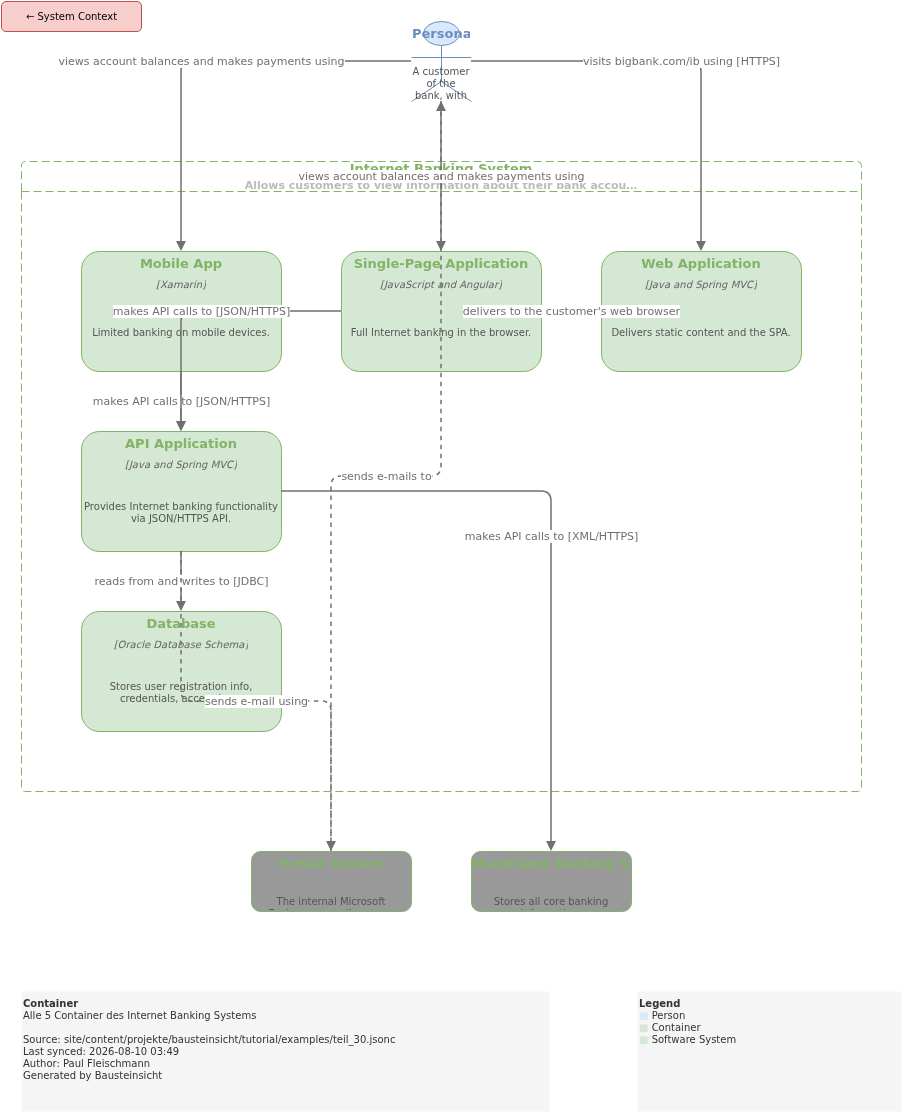
    "containers": {
      "title": "Container",
      "description": "Alle 5 Container des Internet Banking Systems",
      "scope": "internet-banking",
      "include": ["customer", "internet-banking.*", "mainframe", "email"]
    },
    "components": {
      "title": "Components (alle)",
      "description": "Alle 6 Komponenten der API Application — volle Übersicht",
      "scope": "internet-banking.api-app",
      "include": [
        "internet-banking.spa", "internet-banking.mobile-app",
        "internet-banking.api-app.*",
        "internet-banking.database", "mainframe", "email"
      ]
    },

    // ── 4 fokussierte Views — das Thema von Teil 30 ──────────────────────────

    "api-internals": {
      "title": "API Internals (Zoom-In)",
      "description": "Nur API App + direkte externe Abhängigkeiten — ohne Frontend-Rauschen",
      "scope": "internet-banking.api-app",
      "include": [
        "internet-banking.api-app.*",
        "internet-banking.database",
        "mainframe",
        "email"
      ]
    },
    "mobile-flow": {
      "title": "Mobile App Flow",
      "description": "Nur der mobile Pfad — Web App und SPA ausgeblendet",
      "include": [
        "customer",
        "internet-banking.mobile-app",
        "internet-banking.api-app.sign-in",
        "internet-banking.api-app.accounts-summary",
        "internet-banking.api-app.reset-password",
        "internet-banking.api-app.security",
        "internet-banking.api-app.mainframe-facade",
        "internet-banking.database",
        "mainframe"
      ]
    },
    "customer-touchpoints": {
      "title": "Customer Touchpoints",
      "description": "Alles was der Kunde direkt sieht und berührt — kein Backend",
      "include": [
        "customer",
        "internet-banking.web-app",
        "internet-banking.spa",
        "internet-banking.mobile-app",
        "atm",
        "support-staff"
      ]
    },
    "security-flow": {
      "title": "Security & Auth Flow",
      "description": "Authentifizierungs- und Passwort-Reset-Pfad — für das Security-Team",
      "include": [
        "internet-banking.spa",
        "internet-banking.mobile-app",
        "internet-banking.api-app.sign-in",
        "internet-banking.api-app.reset-password",
        "internet-banking.api-app.security",
        "internet-banking.api-app.email-component",
        "internet-banking.database",
        "email"
      ]
    }
  }
}
Ergebnis: 7 Tabs in draw.io
bausteinsicht sync erzeugt 7 draw.io Tabs:
| Tab | Titel | Zielgruppe |
|---|---|---|
| System Context | Management, Stakeholder |
| Container | Architekten |
| Components (alle) | Alle Entwickler |
| API Internals | Backend-Team |
| Mobile App Flow | Mobile-Entwickler |
| Customer Touchpoints | Product Owner, UX |
| Security & Auth Flow | Security-Team, Auditor |
Das draw.io-File dafür findest du hier: teil_30.drawio
Generierte PNG-Dateien:
Generierte PlantUML-Diagramme:
Views benennen: Tab-Reihenfolge in draw.io
Die Reihenfolge der Views im JSONC bestimmt die Tab-Reihenfolge in draw.io. Am sinnvollsten: von abstrakt nach konkret — wie in C4.
"views": {
  "context":    { ... },   // Tab 1: abstrakt
  "containers": { ... },   // Tab 2
  "components": { ... },   // Tab 3: konkret
  "api-internals": { ... } // Tab 4: Zoom-In
}
View-Keys werden zu draw.io Tab-Namen. Sprechende Keys ( |
Was als nächstes kommt
Weiter geht’s mit Teil 31: Klickbare Links in exportierten Diagrammen —
wie das link-Feld Diagramme zu einem Einstiegspunkt in ADRs, Tickets und Confluence-Seiten macht.
Die wichtigsten Einstiegspunkte zum Nachschlagen:
Neu starten? → Teil 2: Getting Started
Tags für View-Filterung? → Teil 23: Tags & View-Filterung
Performance bei großen Modellen? → Teil 28: Performance
Structurizr migrieren? → Teil 29: Big Bank Import
Offizielle Dokumentation: User Manual · Tutorial auf doctoolchain.org