This post continues from the fifteenth part. In larger organizations, each team maintains its own architecture model. The workspace combines multiple models into a unified view — without giving up team autonomy.
The Problem: Team Boundaries in the Architecture Model
Team A owns shop-model/architecture.jsonc, Team B owns auth-model/architecture.jsonc.
Both want to maintain their models independently — but the platform architecture needs an overall view.
The workspace is the answer: a workspace.jsonc references both models and defines the connections between them.
workspace.jsonc
{
  "workspace": {
    "name": "E-Commerce Platform",
    "description": "Overall architecture of all teams"
  },
  "models": [
    {
      "id":     "shop",
      "path":   "teams/shop/architecture.jsonc",
      "prefix": "shop"
    },
    {
      "id":     "auth",
      "path":   "teams/auth/architecture.jsonc",
      "prefix": "auth"
    },
    {
      "id":     "payment",
      "path":   "teams/payment/architecture.jsonc",
      "prefix": "payment"
    }
  ],
  "crossModelRelationships": [
    {
      "id":    "shop-uses-auth",
      "from":  "shop.api",
      "to":    "auth.service",
      "label": "authenticate",
      "kind":  "rest"
    },
    {
      "id":    "shop-uses-payment",
      "from":  "shop.checkout",
      "to":    "payment.gateway",
      "label": "charge",
      "kind":  "rest"
    }
  ],
  "views": {
    "platform-overview": {
      "title":       "Platform Overview",
      "include-from": ["shop", "auth", "payment"],
      "description": "All teams, top-level elements only"
    },
    "checkout-flow": {
      "title":       "Checkout Flow",
      "include-from": ["shop", "payment"],
      "include-kinds": ["service", "database"]
    }
  }
}
Element Prefix
The prefix field prevents ID collisions during merge: api from the shop model becomes shop.api, service from the auth model becomes auth.service.
Without an explicit prefix, the model’s id is used as the prefix.
bausteinsicht workspace list
List models in the workspace:
bausteinsicht workspace list workspace.jsoncOutput:
Workspace: E-Commerce Platform
Description: Overall architecture of all teams

Models:
  1. ID: shop, Path: teams/shop/architecture.jsonc, Prefix: shop
  2. ID: auth, Path: teams/auth/architecture.jsonc, Prefix: auth
  3. ID: payment, Path: teams/payment/architecture.jsonc, Prefix: payment

Cross-Model Relationships: 2
Workspace Views: 2
bausteinsicht workspace validate
Load and validate all referenced models:
bausteinsicht workspace validate workspace.jsoncChecks:
* All model paths exist and are valid JSONC
* Each individual model passes bausteinsicht validate
* Cross-model references point to existing (prefixed) elements
On success:
✓ Workspace configuration is valid (3 models)
JSON output for CI:
bausteinsicht workspace validate workspace.jsonc --format json
# → {"valid": true, "models": 3}
bausteinsicht workspace merge
Merge all models into a single combined model:
bausteinsicht workspace merge workspace.jsonc merged-architecture.jsoncThe resulting merged-architecture.jsonc:
Contains all elements from all teams with prefixed IDs
Contains all cross-model relationships
Passes
bausteinsicht validate
The merged model can then be used for exports, graph analysis, or overlay visualization:
bausteinsicht workspace merge workspace.jsonc /tmp/merged.jsonc

# Graph analysis on the overall architecture
bausteinsicht graph --model /tmp/merged.jsonc

# Overlay on overall diagram
bausteinsicht overlay apply metrics.json --model /tmp/merged.jsonc --metric error_rate
Typical Workspace Structure in the Repository
architecture/
├── workspace.jsonc          ← Workspace configuration
├── teams/
│   ├── shop/
│   │   ├── architecture.jsonc
│   │   └── architecture.drawio
│   ├── auth/
│   │   ├── architecture.jsonc
│   │   └── architecture.drawio
│   └── payment/
│       ├── architecture.jsonc
│       └── architecture.drawio
└── merged/
    └── architecture.jsonc   ← Generated, do not edit manually
Add the merged/ directory to .gitignore or treat it as a build artifact — it is regenerated from the team models and should not be edited directly. |
CI: Workspace Validation
- name: Validate workspace
  run: bausteinsicht workspace validate architecture/workspace.jsonc

- name: Merge and analyze
  run: |
    bausteinsicht workspace merge architecture/workspace.jsonc /tmp/merged.jsonc
    bausteinsicht graph --model /tmp/merged.jsonc --cycles-only
Example Model
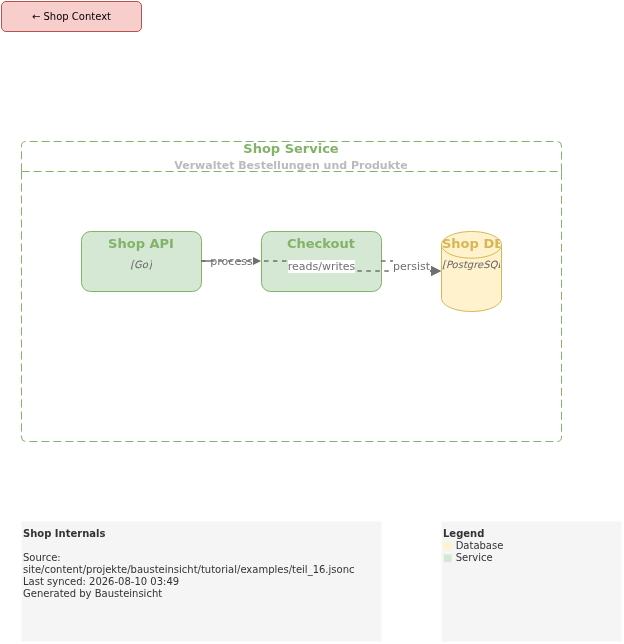
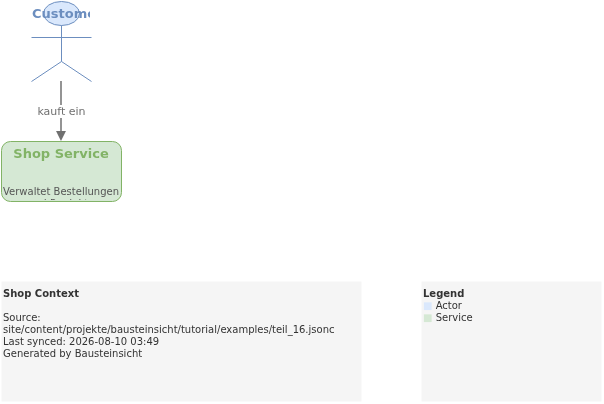
The example for this part (team model "shop" — one of several models in the workspace) is located at teil_16.jsonc.
This is what the result looks like in draw.io (bausteinsicht sync):
You can find the draw.io file here: teil_16.drawio
Generated PNG files via bausteinsicht export --image-format png:
Generated PlantUML diagrams via bausteinsicht export-diagram:
What Comes Next
Part 17: Sequence Diagrams — Export dynamic views as PlantUML and Mermaid
Part 18: CLI Modeling — Build architecture directly from the command line
Official documentation: User Manual · Tutorial on doctoolchain.org