This post continues from the seventh part. Architecture principles are easy to write down in ADRs. What is harder is ensuring that the code — and the architecture — actually adheres to those principles over months and across teams. Bausteinsicht solves this with machine-checkable constraints.
What Is Architecture Linting?
Linting is familiar from development: ESLint checks JavaScript code for style rules and errors, go vet checks Go code for antipatterns.
Architecture linting does the same for the architecture model:
No direct database connections from the UI layer
All systems must have a description
Maximum nesting depth of 3 levels
No circular dependencies
Only approved technologies
These rules are defined in the model as constraints and checked with bausteinsicht lint.
Defining Constraints in the Model
Constraints belong in the constraints array in architecture.jsonc (→ Part 3).
Each constraint requires an id, description, and rule — plus rule-specific fields.
no-relationship
Prevents direct connections between certain element types:
"constraints": [
  {
    "id":          "NO-UI-DB",
    "description": "UI components must not access the database directly",
    "rule":        "no-relationship",
    "from-kind":   "component",
    "to-kind":     "database"
  }
]
allowed-relationship
Positively defines which element types may connect to a specific type:
{
  "id":          "DB-ACCESS-ONLY-SERVICES",
  "description": "Only services and repositories may access databases",
  "rule":        "allowed-relationship",
  "to-kind":     "database",
  "from-kinds":  ["service", "repository"]
}
required-field
Enforces that a field is set on all elements of a specific type:
{
  "id":           "SYSTEM-NEEDS-DESCRIPTION",
  "description":  "All systems must have a description",
  "rule":         "required-field",
  "element-kind": "system",
  "field":        "description"
},
{
  "id":           "CONTAINER-NEEDS-TECHNOLOGY",
  "description":  "All containers must specify a technology",
  "rule":         "required-field",
  "element-kind": "container",
  "field":        "technology"
}
Supported fields: description, technology, title.
max-depth
Limits the nesting depth of the model:
{
  "id":          "MAX-NESTING-3",
  "description": "Maximum nesting depth is 3 (System → Container → Component)",
  "rule":        "max-depth",
  "max":         3
}
no-circular-dependency
Detects cycles in the dependency graph using depth-first search:
{
  "id":          "NO-CYCLES",
  "description": "No circular dependencies between elements",
  "rule":        "no-circular-dependency"
}
technology-allowed
Enforces an approved technology stack:
{
  "id":           "APPROVED-BACKEND-STACK",
  "description":  "Backend containers may only use approved technologies",
  "rule":         "technology-allowed",
  "element-kind": "container",
  "technologies": ["Go", "Rust", "Python", "PostgreSQL", "Redis"]
}
bausteinsicht lint
bausteinsicht lintOutput when violations are found:
VIOLATION [NO-UI-DB]: UI-Komponenten dürfen nicht direkt auf die Datenbank zugreifen: component kind must not relate to database kind
  - shop.frontend → shop.db
VIOLATION [CONTAINER-NEEDS-TECHNOLOGY]: Alle Container müssen eine Technologie angeben: all container elements must have "technology" set
  - shop.legacy: missing technology
lint: 2 violation(s) found
Output when all rules pass:
All constraints passed.
Exit code: 0 on success, 1 on violations — making it directly usable in CI.
JSON Output for CI Evaluation
bausteinsicht lint --format json{
"passed": false,
"total": 2,
"violations": [
{
"constraintId": "NO-UI-DB",
"message": "...",
"elements": ["shop.frontend → shop.db"]
}
]
}bausteinsicht validate
validate is lighter than lint — it only checks the structural correctness of the model (schema, references):
bausteinsicht validateChecks:
All
kindvalues inmodelare defined inspecification.elementsAll
kindvalues inrelationshipsare defined inspecification.relationshipsAll
decisionsreferences in elements exist inspecification.decisionsAll
tagsin elements are defined inspecification.tagscontainer: truefor elements withchildren
validate runs implicitly before every sync — an invalid model will not be synchronized.
bausteinsicht health
health evaluates architecture quality across multiple dimensions and gives a score from 0–100 (grade A–F):
bausteinsicht healthOutput:
Architecture Health Report
==========================

Overall Score: 74.5/100 [B]
Summary: Good architecture documentation with some gaps
Timestamp: 2025-06-11T14:30:22Z

Model Statistics
----------------
Elements:      15
Relationships: 11
Views:          3

Category Scores
---------------
Completeness:  85.0/100 (weight: 40%)
  Details: 13/15 elements have descriptions
Conformance:   90.0/100 (weight: 30%)
  Details: All constraints passed
Complexity:    60.0/100 (weight: 30%)
  Details: High relationship density detected

Findings
--------
Completeness (2 findings):
  [WARN] Missing descriptions
         shop.legacy, shop.legacy.api: description is empty

Complexity (1 finding):
  [INFO] High coupling
         shop.api has 7 outgoing relationships — consider splitting
Short view for CI dashboards:
bausteinsicht health --summary
# → Overall Score: 74.5/100 [B]

# As JSON
bausteinsicht health --format json --summary

# Write report to file
bausteinsicht health --output docs/health-report.txt
CI/CD Integration
lint and validate are designed directly for CI. GitHub Actions example:
- name: Validate architecture model
  run: bausteinsicht validate

- name: Lint architecture constraints
  run: bausteinsicht lint

- name: Architecture health check (informational)
  run: bausteinsicht health --summary
  continue-on-error: true  # health does not break the build, it only informs
lint returns exit code 1 on violations — the CI build fails.
This is intentional: architecture rules should be just as binding as coding guidelines. |
Complete Constraint Set for a Layered Architecture
"constraints": [
  {
    "id":          "NO-CYCLES",
    "description": "No circular dependencies",
    "rule":        "no-circular-dependency"
  },
  {
    "id":          "NO-UI-TO-DB",
    "description": "UI does not access DB directly",
    "rule":        "no-relationship",
    "from-kind":   "frontend",
    "to-kind":     "database"
  },
  {
    "id":          "DB-ONLY-FROM-BACKEND",
    "description": "Only backend services access the DB",
    "rule":        "allowed-relationship",
    "to-kind":     "database",
    "from-kinds":  ["service", "repository"]
  },
  {
    "id":          "MAX-DEPTH",
    "description": "Maximum depth: System → Container → Component",
    "rule":        "max-depth",
    "max":         3
  },
  {
    "id":           "SYSTEM-DOCUMENTED",
    "description":  "All systems need a description",
    "rule":         "required-field",
    "element-kind": "system",
    "field":        "description"
  },
  {
    "id":           "CONTAINER-TECH",
    "description":  "All containers declare their technology",
    "rule":         "required-field",
    "element-kind": "container",
    "field":        "technology"
  },
  {
    "id":           "APPROVED-STACK",
    "description":  "Only approved technologies",
    "rule":         "technology-allowed",
    "element-kind": "container",
    "technologies": ["Go", "TypeScript", "React", "PostgreSQL", "Redis", "Kafka"]
  }
]
Example Model
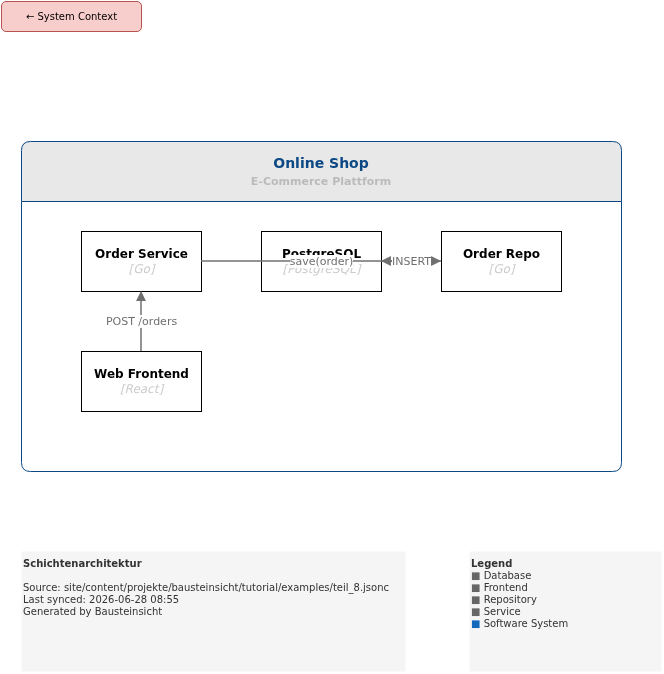
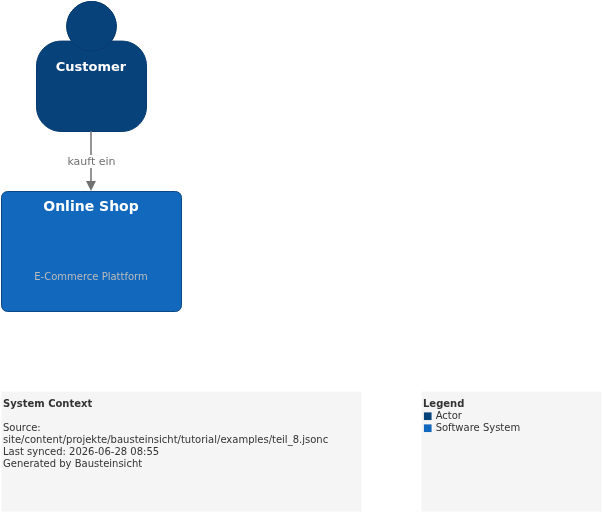
The example for this part with layered architecture and constraints is located at teil_8.jsonc.
This is what the result looks like in draw.io (bausteinsicht sync):
You can find the draw.io file here: teil_8.drawio
Generated PNG files via bausteinsicht export --image-format png:
Generated PlantUML diagrams via bausteinsicht export-diagram:
What Comes Next
Part 9: Graph Analysis — Uncover cycles and dependencies with
bausteinsicht graphPart 10: Overlay & Heatmap — Project metrics onto architecture diagrams
Official documentation: User Manual · Tutorial on doctoolchain.org