This post builds on Part 28. All previous examples in the tutorial showed fictional systems. Here comes a real reference model: the Big Bank Example by Simon Brown — the inventor of the C4 model and lead developer of Structurizr.
And for the first time it is not written by hand, but imported directly from Structurizr DSL.
|
What Is the Big Bank Example?
The Big Bank Example is the official reference model for the Structurizr documentation. It shows a fictional retail bank with an Internet Banking System across three C4 levels:
System Context — customers, bank staff, ATM, external systems
Container — Web App, SPA, Mobile App, API Application, Oracle database
Component — six components of the API Application
The model is complex enough to demonstrate all features of Bausteinsicht, and well-known enough to be immediately understood.
Original in Structurizr DSL: https://structurizr.connectedpdf.com/share/3/dsl
Structurizr Container diagram live: https://structurizr.com/embed/39258?diagram=Containers&diagramSelector=false
Prerequisites
# Bausteinsicht from main (until v1.2.0 is released):
go install github.com/docToolchain/Bausteinsicht/cmd/bausteinsicht@main

# Or with Node.js installed:
npm install -g @doctoolchain/bausteinsicht@next
An empty directory for the experiment:
mkdir bigbank && cd bigbankStep 1: Download the DSL
Fetch the combined Big Bank DSL (System Landscape + Internet Banking System) directly from Structurizr:
curl -o bigbank.dsl https://structurizr.connectedpdf.com/share/3/dslworkspace "Big Bank plc" "This is an example workspace..." {
model {
customer = person "Personal Banking Customer" "..."
enterprise "Big Bank plc" {
supportStaff = person "Customer Service Staff" "..."
backoffice = person "Back Office Staff" "..."
mainframe = softwaresystem "Mainframe Banking System" "..." "Existing System"
email = softwaresystem "E-mail System" "..." "Existing System"
atm = softwaresystem "ATM" "..." "Existing System"
internetBankingSystem = softwaresystem "Internet Banking System" "..." {
webApplication = container "Web Application" "..." "Java and Spring MVC"
spa = container "Single-Page Application" "..." "JavaScript and Angular"
mobileApp = container "Mobile App" "..." "Xamarin"
apiApplication = container "API Application" "..." "Java and Spring MVC" {
signinController = component "Sign In Controller" "..." "Spring MVC"
accountsSummaryController = component "Accounts Summary Controller" "..." "Spring MVC"
resetPasswordController = component "Reset Password Controller" "..." "Spring MVC"
securityComponent = component "Security Component" "..." "Spring Bean"
mainframeBankingSystemFacade = component "Mainframe Banking System Facade" "..." "Spring Bean"
emailComponent = component "E-mail Component" "..." "Spring Bean"
}
database = container "Database" "..." "Oracle Database Schema"
}
}
customer -> internetBankingSystem "Views account balances, and makes payments using"
customer -> supportStaff "Asks questions to" "Telephone"
customer -> atm "Withdraws cash using"
...
}
}Step 2: Preview with --dry-run
Before writing any file, run the import as a preview:
bausteinsicht import --from structurizr bigbank.dsl --dry-runThe command outputs the generated JSONC to stdout — without writing anything.
This lets you check whether the parsing is correct before overwriting an existing architecture.jsonc.
{
  "$schema": "https://raw.githubusercontent.com/docToolchain/Bausteinsicht/main/schemas/bausteinsicht.schema.json",
  "specification": {
    "elements": {
      "person":    { "notation": "Person" },
      "system":    { "notation": "Software System", "container": true },
      "container": { "notation": "Container",       "container": true },
      "component": { "notation": "Component",       "container": true }
    },
    "relationships": {
      "uses": { "notation": "uses" }
    },
    "tags": [
      { "id": "existing-system" },
      { "id": "bank-staff" },
      { "id": "web-browser" },
      { "id": "mobile-app" },
      { "id": "database" }
    ]
  },
  "model": { ... },
  "relationships": [ ... ],
  "views": { ... }
}
If parsing a particular DSL construct is not supported, |
Step 3: Run the Import
bausteinsicht import --from structurizr bigbank.dslResult:
✓ Parsed 3 persons, 4 systems, 5 containers, 6 components
✓ Resolved 25 relationships
⚠ Skipped: deploymentEnvironment "Development" (not supported)
⚠ Skipped: deploymentEnvironment "Live" (not supported)
✓ Written architecture.jsonc
architecture.jsonc is now in the directory.
The generated file for the Big Bank Example is shown here:
{
  // Teil 29: Big Bank Example — transformiert von Structurizr DSL nach Bausteinsicht JSONC
  // Original DSL: https://structurizr.connectedpdf.com/share/3/dsl
  // Quelle: Simon Brown, Big Bank plc (kombiniert aus workspace 28201 + 36141)
  "$schema": "https://raw.githubusercontent.com/docToolchain/Bausteinsicht/main/schemas/bausteinsicht.schema.json",
  "config": {
    "author": "Simon Brown (Original), Paul Fleischmann (Bausteinsicht-Transformation)",
    "metadata": true,
    "legend": true
  },
  "specification": {
    "elements": {
      "actor":     { "notation": "Person" },
      "system":    { "notation": "Software System", "container": true },
      "container": { "notation": "Container",        "container": true },
      "component": { "notation": "Component",        "container": true }
    },
    "relationships": {
      "uses":  { "notation": "uses" },
      "sends": { "notation": "sends", "dashed": true }
    },
    "tags": [
      {
        "id": "external",
        "description": "Existing System — nicht unter unserer Kontrolle",
        "style": { "fillColor": "#999999", "fontColor": "#ffffff" }
      },
      {
        "id": "bank-staff",
        "description": "Bankmitarbeiter (intern)",
        "style": { "fillColor": "#08427b", "fontColor": "#ffffff" }
      },
      {
        "id": "web-browser",
        "description": "Läuft im Web-Browser des Kunden"
      },
      {
        "id": "mobile",
        "description": "Läuft auf dem Mobilgerät des Kunden"
      },
      {
        "id": "database",
        "description": "Datenbank"
      }
    ]
  },
  "model": {
    // ── Personen ─────────────────────────────────────────────────────────────
    "customer": {
      "kind": "actor",
      "title": "Personal Banking Customer",
      "description": "A customer of the bank, with personal bank accounts."
    },
    "support-staff": {
      "kind": "actor",
      "title": "Customer Service Staff",
      "description": "Customer service staff within the bank.",
      "tags": ["bank-staff"]
    },
    "backoffice": {
      "kind": "actor",
      "title": "Back Office Staff",
      "description": "Administration and support staff within the bank.",
      "tags": ["bank-staff"]
    },

    // ── Externe Systeme ───────────────────────────────────────────────────────
    "mainframe": {
      "kind": "system",
      "title": "Mainframe Banking System",
      "description": "Stores all of the core banking information about customers, accounts, transactions, etc.",
      "tags": ["external"]
    },
    "email": {
      "kind": "system",
      "title": "E-mail System",
      "description": "The internal Microsoft Exchange e-mail system.",
      "tags": ["external"]
    },
    "atm": {
      "kind": "system",
      "title": "ATM",
      "description": "Allows customers to withdraw cash.",
      "tags": ["external"]
    },

    // ── Internet Banking System (intern, mit Containern) ──────────────────────
    "internet-banking": {
      "kind": "system",
      "title": "Internet Banking System",
      "description": "Allows customers to view information about their bank accounts, and make payments.",
      "status": "deployed",
      "children": {
        "web-app": {
          "kind": "container",
          "title": "Web Application",
          "technology": "Java and Spring MVC",
          "description": "Delivers the static content and the Internet banking single page application.",
          "status": "deployed"
        },
        "spa": {
          "kind": "container",
          "title": "Single-Page Application",
          "technology": "JavaScript and Angular",
          "description": "Provides all of the Internet banking functionality to customers via their web browser.",
          "status": "deployed",
          "tags": ["web-browser"]
        },
        "mobile-app": {
          "kind": "container",
          "title": "Mobile App",
          "technology": "Xamarin",
          "description": "Provides a limited subset of the Internet banking functionality to customers via their mobile device.",
          "status": "deployed",
          "tags": ["mobile"]
        },
        "api-app": {
          "kind": "container",
          "title": "API Application",
          "technology": "Java and Spring MVC",
          "description": "Provides Internet banking functionality via a JSON/HTTPS API.",
          "status": "deployed",
          "children": {
            "sign-in": {
              "kind": "component",
              "title": "Sign In Controller",
              "technology": "Spring MVC Rest Controller",
              "description": "Allows users to sign in to the Internet Banking System."
            },
            "accounts-summary": {
              "kind": "component",
              "title": "Accounts Summary Controller",
              "technology": "Spring MVC Rest Controller",
              "description": "Provides customers with a summary of their bank accounts."
            },
            "reset-password": {
              "kind": "component",
              "title": "Reset Password Controller",
              "technology": "Spring MVC Rest Controller",
              "description": "Allows users to reset their passwords with a single use URL."
            },
            "security": {
              "kind": "component",
              "title": "Security Component",
              "technology": "Spring Bean",
              "description": "Provides functionality related to signing in, changing passwords, etc."
            },
            "mainframe-facade": {
              "kind": "component",
              "title": "Mainframe Banking System Facade",
              "technology": "Spring Bean",
              "description": "A facade onto the mainframe banking system."
            },
            "email-component": {
              "kind": "component",
              "title": "E-mail Component",
              "technology": "Spring Bean",
              "description": "Sends e-mails to users."
            }
          }
        },
        "database": {
          "kind": "container",
          "title": "Database",
          "technology": "Oracle Database Schema",
          "description": "Stores user registration information, hashed authentication credentials, access logs, etc.",
          "status": "deployed",
          "tags": ["database"]
        }
      }
    }
  },

  "relationships": [
    // ── System Context ────────────────────────────────────────────────────────
    { "from": "customer",       "to": "internet-banking", "label": "views account balances, and makes payments using",  "kind": "uses" },
    { "from": "customer",       "to": "support-staff",    "label": "asks questions to",       "kind": "uses" },
    { "from": "customer",       "to": "atm",              "label": "withdraws cash using",     "kind": "uses" },
    { "from": "support-staff",  "to": "mainframe",        "label": "uses",                     "kind": "uses" },
    { "from": "backoffice",     "to": "mainframe",        "label": "uses",                     "kind": "uses" },
    { "from": "atm",            "to": "mainframe",        "label": "uses",                     "kind": "uses" },
    { "from": "internet-banking", "to": "mainframe",      "label": "gets account information from, and makes payments using", "kind": "uses" },
    { "from": "internet-banking", "to": "email",          "label": "sends e-mail using",       "kind": "sends" },
    { "from": "email",          "to": "customer",         "label": "sends e-mails to",         "kind": "sends" },

    // ── Container: Customer → Frontend ────────────────────────────────────────
    { "from": "customer",                  "to": "internet-banking.web-app",    "label": "visits bigbank.com/ib using [HTTPS]",                             "kind": "uses" },
    { "from": "customer",                  "to": "internet-banking.spa",        "label": "views account balances, and makes payments using",                "kind": "uses" },
    { "from": "customer",                  "to": "internet-banking.mobile-app", "label": "views account balances, and makes payments using",                "kind": "uses" },
    { "from": "internet-banking.web-app",  "to": "internet-banking.spa",        "label": "delivers to the customer's web browser",                         "kind": "uses" },

    // ── Container: Frontend → Components ─────────────────────────────────────
    { "from": "internet-banking.spa",        "to": "internet-banking.api-app.sign-in",        "label": "makes API calls to [JSON/HTTPS]", "kind": "uses" },
    { "from": "internet-banking.spa",        "to": "internet-banking.api-app.accounts-summary","label": "makes API calls to [JSON/HTTPS]", "kind": "uses" },
    { "from": "internet-banking.spa",        "to": "internet-banking.api-app.reset-password",  "label": "makes API calls to [JSON/HTTPS]", "kind": "uses" },
    { "from": "internet-banking.mobile-app", "to": "internet-banking.api-app.sign-in",         "label": "makes API calls to [JSON/HTTPS]", "kind": "uses" },
    { "from": "internet-banking.mobile-app", "to": "internet-banking.api-app.accounts-summary","label": "makes API calls to [JSON/HTTPS]", "kind": "uses" },
    { "from": "internet-banking.mobile-app", "to": "internet-banking.api-app.reset-password",  "label": "makes API calls to [JSON/HTTPS]", "kind": "uses" },

    // ── Component: intern ─────────────────────────────────────────────────────
    { "from": "internet-banking.api-app.sign-in",        "to": "internet-banking.api-app.security",        "label": "uses", "kind": "uses" },
    { "from": "internet-banking.api-app.accounts-summary","to": "internet-banking.api-app.mainframe-facade","label": "uses", "kind": "uses" },
    { "from": "internet-banking.api-app.reset-password",  "to": "internet-banking.api-app.security",        "label": "uses", "kind": "uses" },
    { "from": "internet-banking.api-app.reset-password",  "to": "internet-banking.api-app.email-component", "label": "uses", "kind": "uses" },
    { "from": "internet-banking.api-app.security",        "to": "internet-banking.database",                "label": "reads from and writes to [JDBC]",  "kind": "uses" },
    { "from": "internet-banking.api-app.mainframe-facade","to": "mainframe",                                "label": "makes API calls to [XML/HTTPS]",   "kind": "uses" },
    { "from": "internet-banking.api-app.email-component", "to": "email",                                    "label": "sends e-mail using",               "kind": "sends" }
  ],

  "views": {
    "context": {
      "title": "System Context — Big Bank plc",
      "description": "Alle Akteure und Systeme rund um das Internet Banking System",
      "include": ["customer", "support-staff", "backoffice", "internet-banking", "mainframe", "email", "atm"]
    },
    "containers": {
      "title": "Container — Internet Banking System",
      "description": "Interne Container des Internet Banking Systems und ihre Nachbarn",
      "scope": "internet-banking",
      "include": ["customer", "internet-banking.*", "mainframe", "email"]
    },
    "components": {
      "title": "Component — API Application",
      "description": "Interne Komponenten der API Application",
      "scope": "internet-banking.api-app",
      "include": [
        "internet-banking.spa",
        "internet-banking.mobile-app",
        "internet-banking.api-app.*",
        "internet-banking.database",
        "mainframe",
        "email"
      ]
    }
  }
}
What the Importer Does Automatically
Hierarchy preserved — Structurizr blocks ({ }) become children objects in JSONC.
The fully dotted path (internet-banking.api-app.sign-in) is derived from the DSL variable names.
Relationships resolved — Structurizr allows relationships that appear before the element definition (a → b).
The importer resolves all references with deferred resolution — the result is always a consistent JSONC.
Tags carried over — Structurizr tags ("Existing System", "Bank Staff", "Web Browser") are transferred 1:1 into specification.tags and attached to the elements.
Views converted — systemContext, container, and component views are translated into Bausteinsicht views.
include * is resolved into an explicit include list.
What Needs Manual Follow-Up
The import is a one-time operation — not a mapping for everything. The following must be added manually:
| Not imported | How to add |
|---|---|
Deployment diagrams | Create separate views in |
Styles / Themes | Populate |
| Local includes are resolved, HTTP includes are not |
| Use the |
Differentiated relationship types | All relationships are imported as |
The most important thing for external systems: Structurizr uses the string tag "Existing System".
The importer carries this over as tag existing-system.
For colored styling in draw.io, simply add a style section to specification.tags:
"specification": {
  "tags": [
    {
      "id": "existing-system",
      "description": "External system — not under our control",
      "style": { "fillColor": "#999999", "fontColor": "#ffffff" }
    }
  ]
}
Step 4: Sync and Diagrams
bausteinsicht syncBausteinsicht generates architecture.drawio with three tabs:
context — System Context: customers, bank staff, ATM, external systems
containers — All containers of the Internet Banking System
components — Six components of the API Application
You can find the draw.io file here: teil_29.drawio
Generated PNG files:
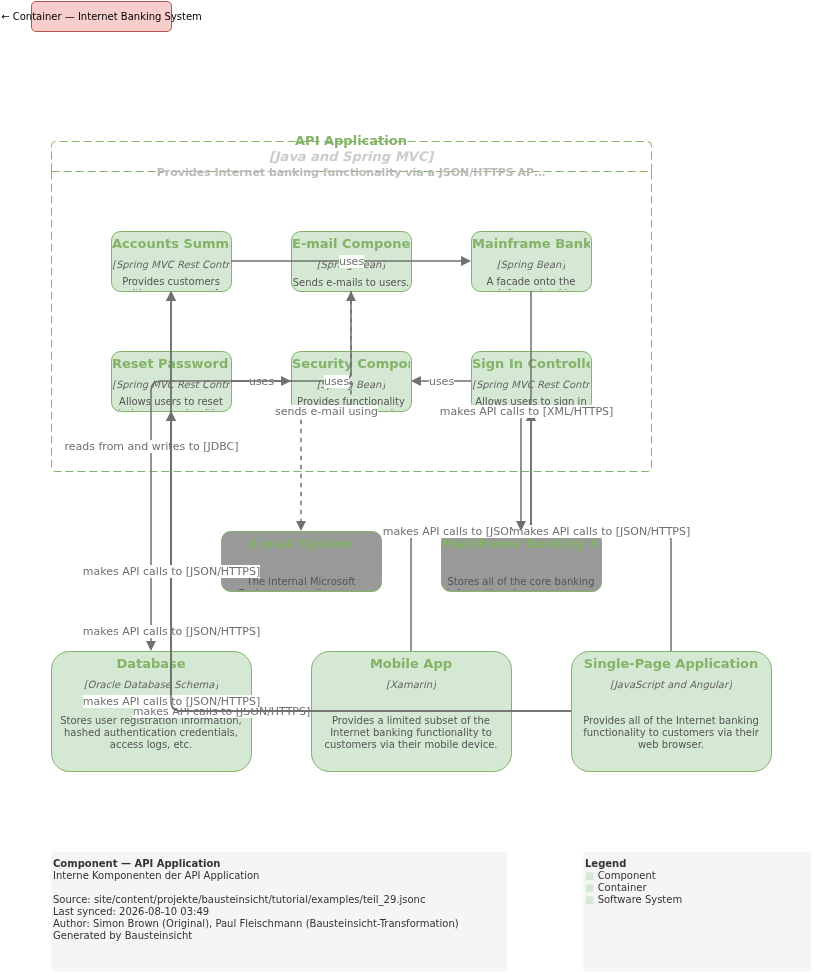
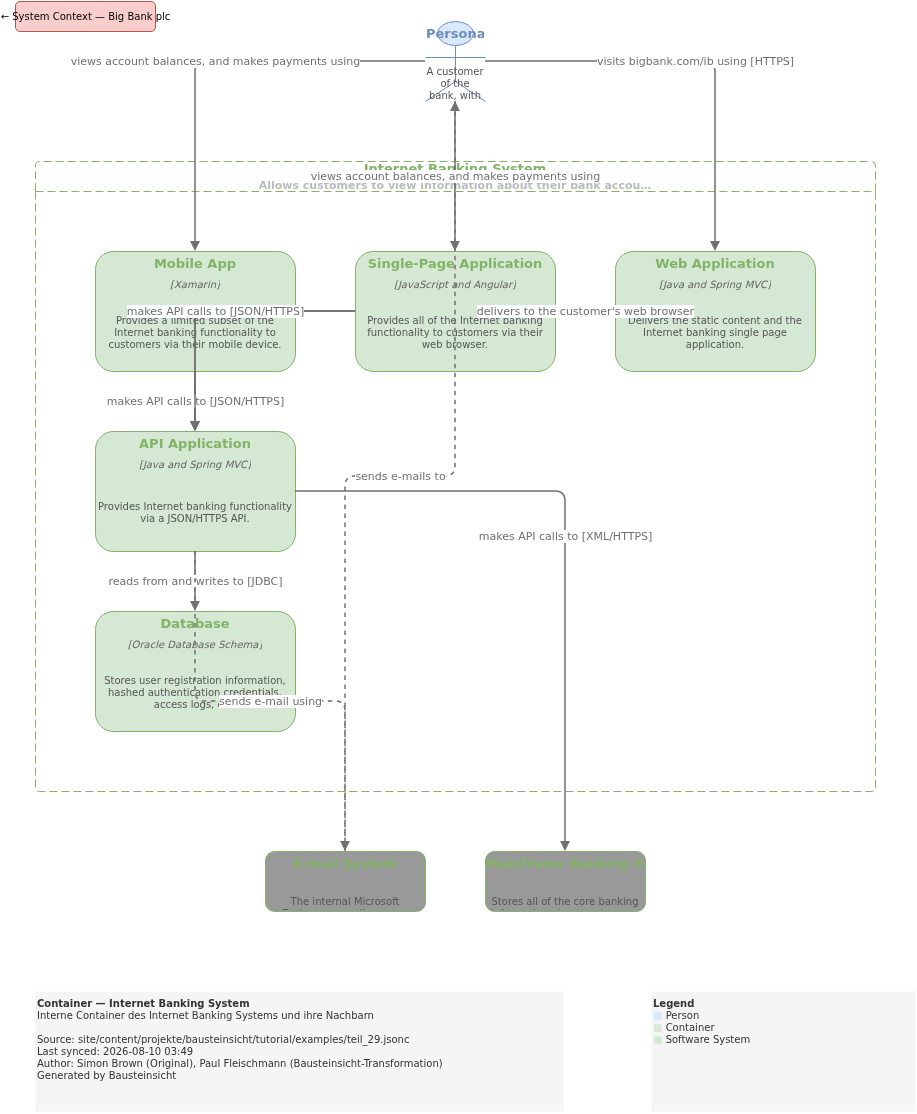
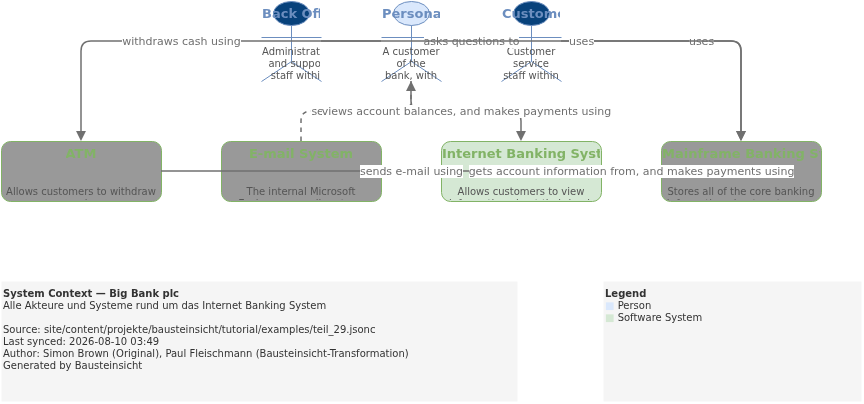
Generated PlantUML diagrams:
Structurizr vs. Bausteinsicht — Quick Comparison
| Aspect | Structurizr | Bausteinsicht |
|---|---|---|
Model format | Custom DSL | JSONC |
Diagram output | SVG via Structurizr server | draw.io (editable, bidirectional) |
Bidirectional | No — DSL is the source of truth | Yes — draw.io changes flow back into JSONC |
Offline | Structurizr Lite required | Fully local |
Deployment diagrams | Native in DSL | No built-in concept |
Import from Structurizr | — |
|
Constraint checking |
|
|
Migration in one direction is now trivial with bausteinsicht import.
There is no importer back to Structurizr — but that is rarely needed in practice.
What Comes Next
Part 30: More Views from One Model — how to generate 7 focused diagrams for different audiences from the Big Bank model
The most important entry points for quick reference:
Starting fresh? → Part 2: Getting Started
Architecture rules? → Part 8: Validation & Linting
Working with AI? → Part 10: LLM/AI Workflows
Team architecture? → Part 16: Workspace
Migrating from other tools? → Part 25: Migration
Official documentation: User Manual · Tutorial on doctoolchain.org