This post continues from the sixth part.
Architecture-as-Code has a decisive advantage over manual diagrams: the architecture lives in the Git repository.
Bausteinsicht leverages this with two tools — snapshot and changelog.
The Problem: Architecture Drift Without Traceability
In agile projects, architecture changes continuously. After six months of development, nobody often remembers: what was decided when? Why did we split the monolith into microservices back then? What happened between Sprint 5 and Sprint 10?
Git solves this for code. bausteinsicht snapshot and changelog solve it for architecture.
bausteinsicht snapshot
Snapshots are named point-in-time captures of the architecture model, stored in .bausteinsicht-snapshots/.
They are independent of Git commits — a snapshot can be saved at any point in time.
Saving a Snapshot
# Simple snapshot without a message
bausteinsicht snapshot save

# Snapshot with a descriptive message
bausteinsicht snapshot save --message "Sprint 5 end: Payment service extracted"
Output:
Snapshot saved: 20250611-143022
  Timestamp: 2025-06-11T14:30:22Z
  Elements:  12
  Relationships: 8
  Message: Sprint 5 Ende: Payment-Service extrahiert
The ID is a timestamp (YYYYMMDD-HHMMSS) — this makes it easy to place snapshots in time.
Listing Snapshots
bausteinsicht snapshot listOutput:
ID               TIMESTAMP            ELEMENTS  RELATIONSHIPS  MESSAGE
20250301-090000  2025-03-01 09:00:00  5         3              Projekt-Start: Monolith
20250415-140000  2025-04-15 14:00:00  8         6              Sprint 3: Auth-Service
20250611-143022  2025-06-11 14:30:22  12        8              Sprint 5: Payment-Service
As JSON for scripting:
bausteinsicht snapshot list --format jsonComparing Snapshots
The key feature: compare two snapshots (or one snapshot against the current model).
# Snapshot vs. current state
bausteinsicht snapshot diff 20250301-090000

# Compare two snapshots
bausteinsicht snapshot diff 20250301-090000 20250611-143022
Output:
Architecture Differences (Total Changes: 9)
==================================================

Added Elements (4):
  + authservice
  + authservice.tokenstore
  + paymentservice
  + paymentservice.ledger

Removed Elements (1):
  - monolith

Changed Elements (2):
  ~ shop.api
      technology: "Go (monolith)" → "Go"
  ~ shop.db
      description: "" → "Primäre Datenbank für Orders und Products"

Added Relationships (3):
  + shop.frontend → authservice (authenticate)
  + shop.api → paymentservice (charge)
  + paymentservice → shop.db (audit log)

Removed Relationships (1):
  - shop.frontend → monolith (uses)
As JSON for CI pipelines or further processing:
bausteinsicht snapshot diff 20250301-090000 --format jsonRestoring a Snapshot
A snapshot can be exported as a JSONC file — for inspection or as a starting point for a new branch:
# Export to a new file
bausteinsicht snapshot restore 20250301-090000 architecture-v1.jsonc

# Overwrite existing file
bausteinsicht snapshot restore 20250301-090000 architecture.jsonc --force
restore overwrites the current model. Make sure the current state is committed in Git or saved as a snapshot beforehand. |
Deleting a Snapshot
bausteinsicht snapshot delete 20250301-090000bausteinsicht changelog
changelog generates a readable architecture changelog from Git history — without requiring snapshots to have been created beforehand.
The command reads the model at two different Git refs (--since and --until) and calculates the difference.
Changelog Since the Last Tag
# Since the last Git tag to HEAD
bausteinsicht changelog

# Explicit references
bausteinsicht changelog --since v1.0.0 --until HEAD

# Since a specific commit
bausteinsicht changelog --since abc1234 --until HEAD

# Only the last sprint (branch-based)
bausteinsicht changelog --since origin/main --until feature/sprint-6
Output Formats
# Markdown (default) — for GitHub PRs, README
bausteinsicht changelog --format markdown

# AsciiDoc — for technical documentation
bausteinsicht changelog --format asciidoc --output docs/architecture-changelog.adoc

# JSON — for CI evaluation
bausteinsicht changelog --format json
Example output (Markdown):
## Architecture Changelog

**From:** v1.0.0 (2025-03-01)
**To:** HEAD (2025-06-11)

### Added Elements (4)
- `authservice` — Auth Service
- `authservice.tokenstore` — Token Store
- `paymentservice` — Payment Service
- `paymentservice.ledger` — Ledger

### Removed Elements (1)
- `monolith` — Legacy Monolith

### Changed Elements (2)
- `shop.api`: technology changed from "Go (monolith)" to "Go"
- `shop.db`: description added

### Added Relationships (3)
- `shop.frontend` → `authservice` (authenticate)
- `shop.api` → `paymentservice` (charge)
- `paymentservice` → `shop.db` (audit log)

### Removed Relationships (1)
- `shop.frontend` → `monolith` (uses)
As-Is / To-Be Comparison
For planned migrations, the model itself provides a comparison mechanism: the asIs and toBe sections (→ Part 3).
bausteinsicht diff visualizes the difference between the current state (asIs) and the target architecture (toBe) as an annotated diagram:
bausteinsicht diffIn the draw.io diagram, the following appear:
New elements (only in
toBe): highlighted in greenElements to be removed (only in
asIs): highlighted in redUnchanged elements: normal
This is the difference from snapshot diff: snapshot diff compares past states, diff visualizes the planned migration path.
Practical Workflow in Agile Projects
| Point in Time | Action |
|---|---|
Sprint start |
|
Major architecture decision | Change model → commit → |
Sprint review |
|
Release |
|
Architecture review every 3 months |
|
PR description |
|
Both snapshots and .bausteinsicht-sync belong in the Git repository. This way, the complete architecture history is under version control — no external tool needed. |
Example Model
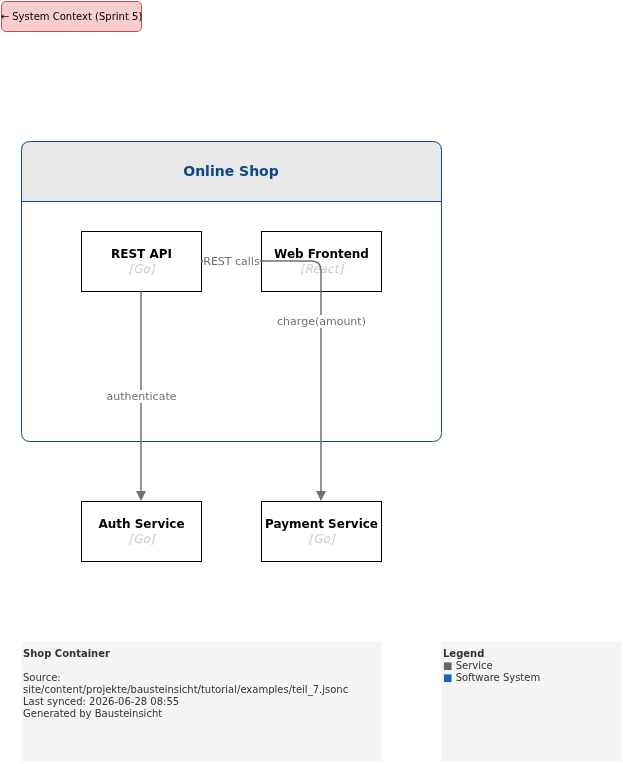
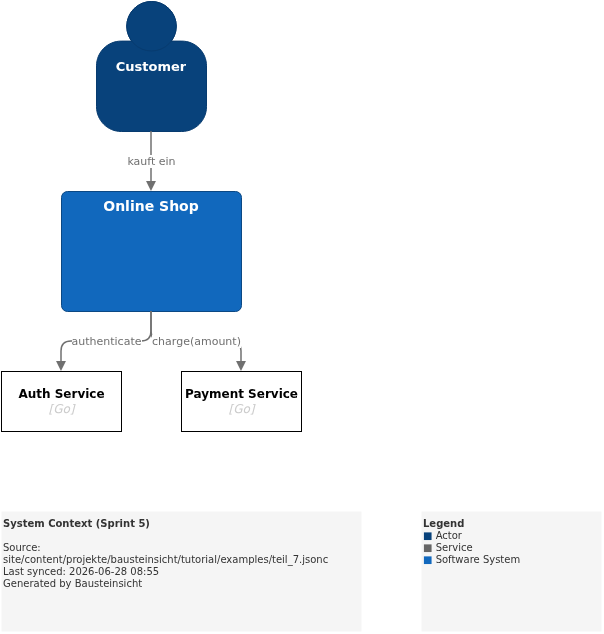
The example for this part (Sprint 5: Payment service extracted) is located at teil_7.jsonc.
This is what the result looks like in draw.io (bausteinsicht sync):
You can find the draw.io file here: teil_7.drawio
Generated PNG files via bausteinsicht export --image-format png:
Generated PlantUML diagrams via bausteinsicht export-diagram:
What Comes Next
Part 8: Validation & Linting — Automatically enforce architecture rules with
bausteinsicht lintPart 9: Graph Analysis — Uncover cycles and dependencies
Official documentation: User Manual · Tutorial on doctoolchain.org