This post continues from the sixteenth part. Static architecture diagrams show structure. Sequence diagrams show behavior — who communicates with whom, and in what order. Bausteinsicht calls these Dynamic Views.
Dynamic Views in the Model
Dynamic Views are defined as an array dynamicViews in architecture.jsonc:
{
  "dynamicViews": [
    {
      "key":         "checkout-flow",
      "title":       "Checkout Flow",
      "description": "Flow of a successful order process",
      "steps": [
        { "index": 1, "from": "shop.frontend", "to": "shop.api",       "label": "POST /orders",      "type": "sync" },
        { "index": 2, "from": "shop.api",      "to": "authservice",    "label": "validate token",    "type": "sync" },
        { "index": 3, "from": "authservice",   "to": "shop.api",       "label": "200 OK",            "type": "return" },
        { "index": 4, "from": "shop.api",      "to": "paymentservice", "label": "charge(amount)",    "type": "sync" },
        { "index": 5, "from": "paymentservice","to": "shop.db",        "label": "INSERT payment",    "type": "sync" },
        { "index": 6, "from": "shop.api",      "to": "shop.db",        "label": "INSERT order",      "type": "sync" },
        { "index": 7, "from": "shop.api",      "to": "eventbus",       "label": "order.created",     "type": "async" },
        { "index": 8, "from": "shop.api",      "to": "shop.frontend",  "label": "201 Created",       "type": "return" }
      ]
    },
    {
      "key":   "auth-refresh",
      "title": "Token Refresh Flow",
      "steps": [
        { "index": 1, "from": "shop.frontend", "to": "authservice", "label": "POST /refresh", "type": "sync" },
        { "index": 2, "from": "authservice",   "to": "shop.frontend","label": "new JWT",       "type": "return" }
      ]
    }
  ]
}
Step Types
| Type | Representation |
|---|---|
| Solid arrow (synchronous call) |
| Dashed arrow (message / event) |
| Dotted return arrow |
bausteinsicht export-sequence
# Export all Dynamic Views as PlantUML (default)
bausteinsicht export-sequence

# As Mermaid
bausteinsicht export-sequence --diagram-format mermaid

# Only a specific view
bausteinsicht export-sequence --view checkout-flow

# Write to directory
bausteinsicht export-sequence --output docs/sequences/
Output (PlantUML, checkout-flow.puml):
@startuml checkout-flow
title Checkout Flow

participant "shop.frontend" as shop_frontend
participant "shop.api" as shop_api
participant "authservice" as authservice
participant "paymentservice" as paymentservice
participant "shop.db" as shop_db
participant "eventbus" as eventbus

shop_frontend -> shop_api : POST /orders
shop_api -> authservice : validate token
authservice --> shop_api : 200 OK
shop_api -> paymentservice : charge(amount)
paymentservice -> shop_db : INSERT payment
shop_api -> shop_db : INSERT order
shop_api ->> eventbus : order.created
shop_api --> shop_frontend : 201 Created
@enduml
Output (Mermaid, checkout-flow.md):
sequenceDiagram
    title Checkout Flow
    shop.frontend->>shop.api: POST /orders
    shop.api->>authservice: validate token
    authservice-->>shop.api: 200 OK
    shop.api->>paymentservice: charge(amount)
    paymentservice->>shop.db: INSERT payment
    shop.api->>shop.db: INSERT order
    shop.api-)eventbus: order.created
    shop.api-->>shop.frontend: 201 Created
Embedding in Documentation
PlantUML can be referenced directly in AsciiDoc:
\[plantuml, checkout-flow, svg]include::sequences/checkout-flow.puml[]
Mermaid works directly in GitHub Markdown and in wikis.
Difference from Static Views
| Aspect | Static View (Part 5) | Dynamic View |
|---|---|---|
Shows | Which elements exist | Who communicates in what order |
Format | draw.io diagram | PlantUML / Mermaid |
Good for | Structural overview | Flow documentation, API description |
The elements in steps do not need to be visible in a static view — they only need to exist in the model. bausteinsicht validate checks all from/to references in Dynamic Views. |
Example Model
The example for this part (model with dynamicViews for the checkout flow) is located at teil_17.jsonc.
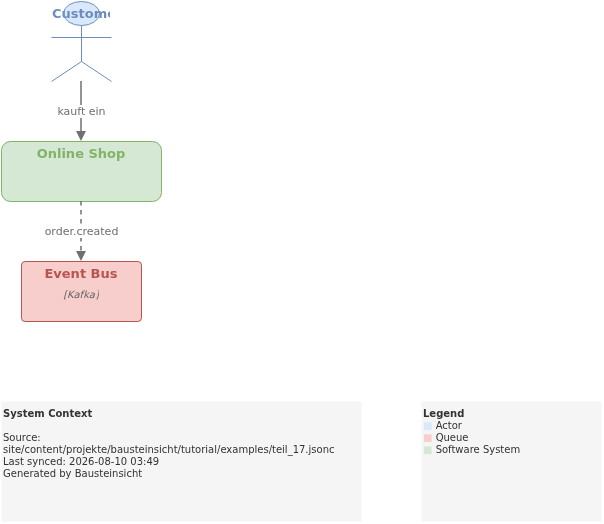
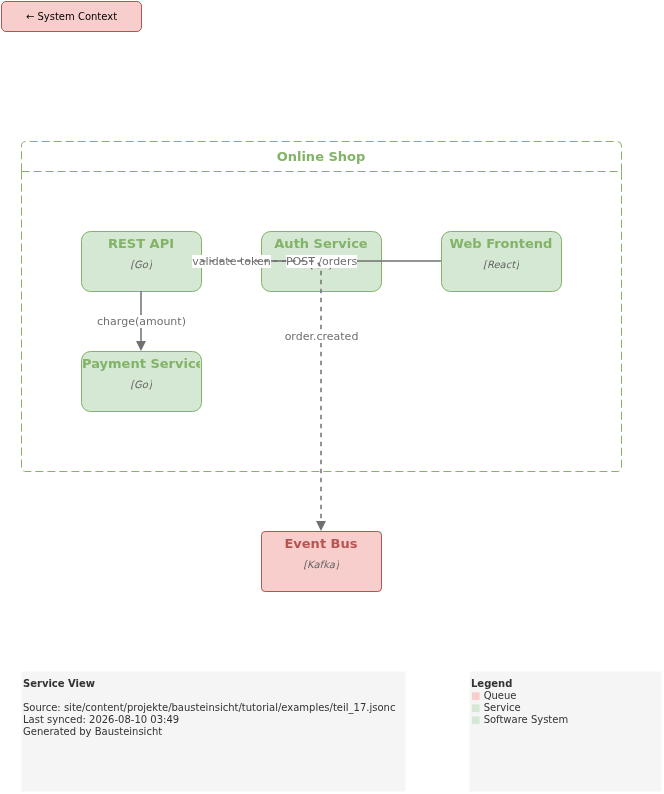
This is what the result looks like in draw.io (bausteinsicht sync):
You can find the draw.io file here: teil_17.drawio
Generated PNG files via bausteinsicht export --image-format png:
Generated PlantUML diagram (static view) via bausteinsicht export-diagram:
What Comes Next
Part 18: CLI Modeling — Add elements, relationships, and views directly from the command line
Part 19: Health Score — Rate architecture quality with A–F grades
Official documentation: User Manual · Tutorial on doctoolchain.org