The Core Problem: Documentation Goes Stale
Software architecture is usually documented once — at the start of the project, when the architect is still motivated and the system is still manageable. Three months later, reality looks different. A new service has been added. A dependency has been moved. The old diagram still shows the original idea, not the current system.
The problem is structural: diagrams live in presentations, wikis, or Draw.io files. Code lives in the repository. The two worlds do not synchronize automatically — so they drift apart.
Architecture-as-Code: Text as the Source of Truth
The answer from the Architecture-as-Code movement: architecture belongs in the repository, alongside the code. Text-based description, versionable, reviewable, diffable. When a service is added, the architecture model changes too — in the same commit, in the same pull request.
The principle works. What makes it harder: text models are not diagrams. Architects and teams think visually. A YAML file describing a graph is correct — but not intuitively navigable.
The Two Camps: Text-first vs. Visual-first
Existing tools each solve the problem from one side:
| Tool | Strength | Weakness |
|---|---|---|
Own DSL, structured C4 model, many export formats | No visual editing — text is the only source | |
Modern DSL, VS Code extension, live preview | Diagram is output, not an editable frontend | |
Clear methodology (Context, Container, Component, Code) | Not a tool, just a framework | |
Extends C4 with interface and flow concepts | Very specifically focused on interaction modeling |
The common denominator: text is the source, diagram is the output. The diagram itself cannot be edited, at least not in a way that flows back into the model.
What Bausteinsicht Does Differently: Bidirectional Synchronization
Bausteinsicht flips the question: why do you have to choose?
The model lives as a JSONC file in the repository — text-based, versionable, LLM-readable. draw.io is the visual frontend — a widely used, mature diagramming tool. Both sides are equal. Changes in the text flow into the diagram. Changes in the diagram flow back into the text.
# Change model → update diagram
bausteinsicht sync

# Edit diagram in draw.io → update model
bausteinsicht sync

# Continuously on every file change
bausteinsicht watch
This is not an export.
It is a merge: positions, labels, new elements — the sync command detects what has changed and reconciles both sides, without overwriting either.
The Model: JSONC with Three Sections
The heart of it is an architecture.jsonc — JSON with comments.
Three sections define everything:
{
  "specification": {
    "elements": {
      "system":    { "notation": "Software System", "container": true },
      "container": { "notation": "Container", "container": true }
    },
    "relationships": {
      "uses": { "notation": "uses" }
    }
  },

  "model": {
    "shop": {
      "kind": "system", "title": "Online Shop",
      "children": {
        "api":      { "kind": "container", "title": "REST API", "technology": "Go" },
        "frontend": { "kind": "container", "title": "Web Frontend", "technology": "React" }
      }
    }
  },

  "views": {
    "context":    { "title": "Context View",   "include": ["shop"] },
    "containers": { "title": "Container View", "scope": "shop", "include": ["shop.*"] }
  }
}
specification defines the language: which kinds of elements and relationships can exist in the model.
model contains the concrete system elements with arbitrarily deep hierarchy.
views controls which elements appear in which diagram — an element can appear in multiple views.
Why draw.io as the Frontend?
draw.io is not a random candidate:
Widely used — many teams already have it in place
Works offline, no cloud dependency
XML-based format that can be read and written programmatically
Free positioning and visual customization possible
The decisive point is the format: draw.io files are uncompressed XML. Bausteinsicht can read the XML selectively, match elements, merge positions, and write the result back — without opening the draw.io application.
That makes bidirectional synchronization technically possible. With a proprietary binary format, it would not be.
Example Model
The example for this part is stored as a runnable JSONC file at teil_1.jsonc.
This is what the result looks like in draw.io (bausteinsicht sync):
The draw.io file for this can be found here: teil_1.drawio
Generated PNG files via bausteinsicht export --image-format png:
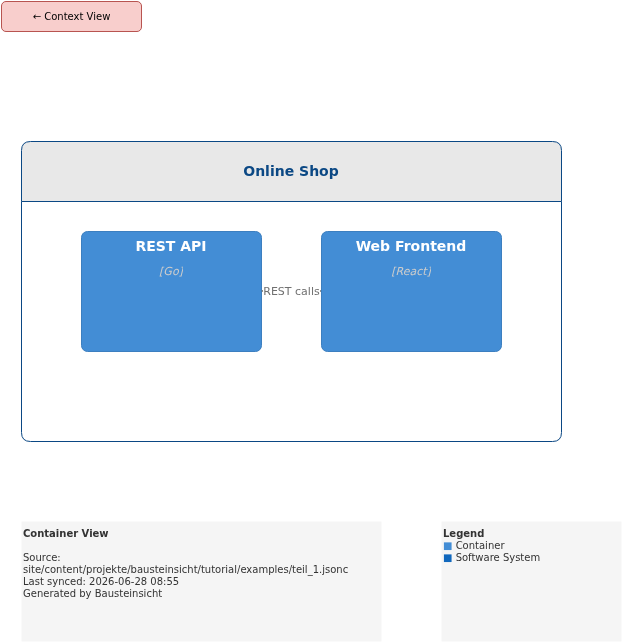
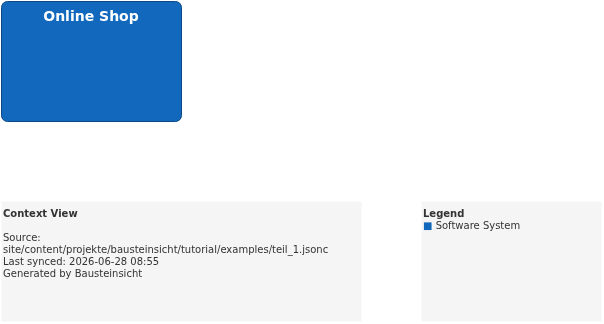
Generated PlantUML diagrams via bausteinsicht export-diagram:
What Comes Next
This post gives an overview — the following posts go into depth:
Getting Started — from an empty folder to the first diagram
The Data Model — specification, model, views in detail
Bidirectional Synchronization — how the merge algorithm works
For those who want to get started right away:
# Installation (Linux amd64)
curl -Lo bausteinsicht.tar.gz \
  https://github.com/docToolchain/Bausteinsicht/releases/latest/download/bausteinsicht_linux_amd64.tar.gz
tar xzf bausteinsicht.tar.gz && sudo mv bausteinsicht /usr/local/bin/

# First project
mkdir my-architecture && cd my-architecture
bausteinsicht init
bausteinsicht sync
Official documentation: User Manual · Tutorial on doctoolchain.org