This post builds directly on Part 29. The Big Bank Example produced 3 views: System Context, Container, Components. That is enough for a documentation page — but not for a real project.
A security architect needs a different diagram than a mobile developer. A manager prefers the customer perspective, not the backend. But all three want to draw from the same model — not maintain three separate files.
This chapter shows how.
The Problem: One View for Everyone
When all elements end up in one view, this happens:
20+ shapes in a single diagram — nobody can take it in at a glance
Every change affects the only diagram — all stakeholders have to deal with it
No clear statement: "what does this diagram want to show?"
The Big Bank Example has 3 actors, 4 systems, 5 containers, 6 components. In a single "everything" view that would be 18 shapes — already too many.
The Solution: One Model, Many Views
Bausteinsicht separates model (what exists) from views (what is shown).
// Model: defined once
"model": { ... },
"relationships": [ ... ],

// Views: any number of lenses onto the same model
"views": {
  "context":            { ... },   // for management
  "containers":         { ... },   // for architects
  "components":         { ... },   // for all developers
  "api-internals":      { ... },   // for the backend team
  "mobile-flow":        { ... },   // for mobile developers
  "customer-touchpoints": { ... }, // for product owners
  "security-flow":      { ... }    // for the security team
}
Each view produces its own tab in architecture.drawio — that is, its own diagram.
The model exists exactly once.
Rule of Thumb: When Do You Need a New View?
| Signal | Response |
|---|---|
A diagram has more than 12–15 shapes | Split into focused views |
Different teams ask for different slices | One view per team |
A diagram shows too much context for its purpose | Use |
Meetings: "can you quickly show the auth flows?" | Create a dedicated |
Someone asks: "what does the customer see?" | Create a dedicated |
The 4 New Views in Detail
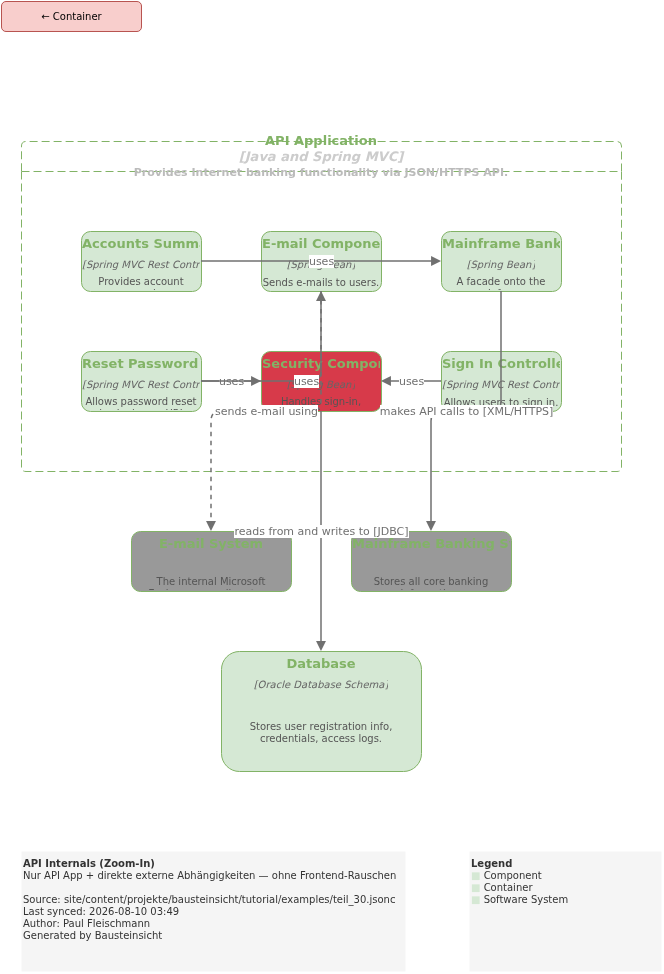
api-internals — Zoom-In Without Frontend Noise
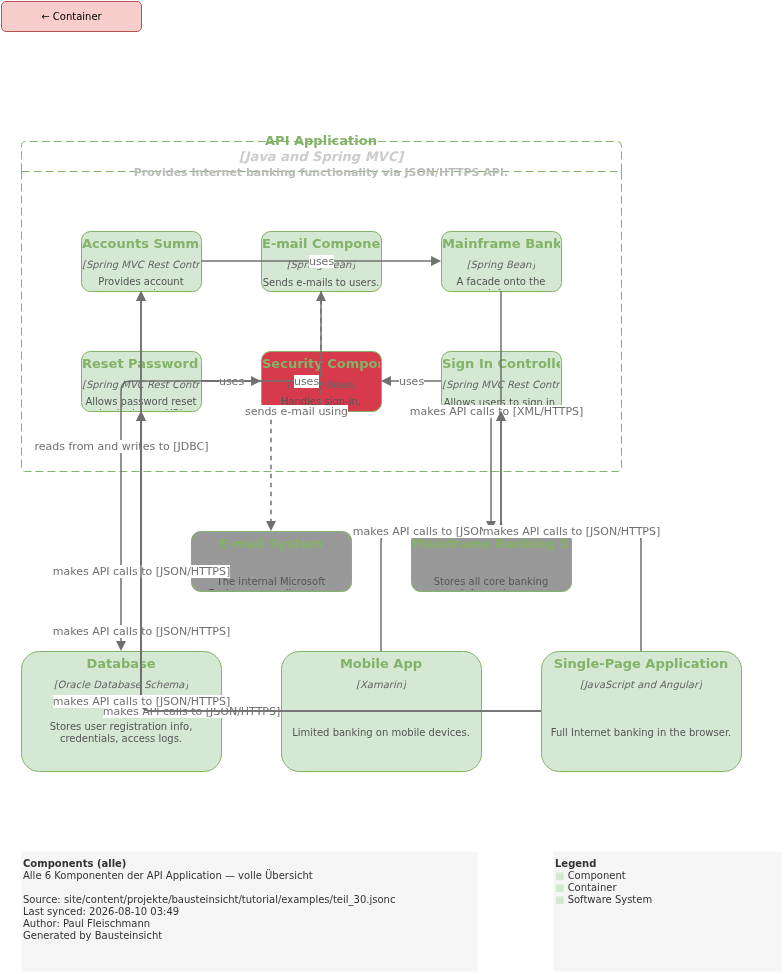
The standard components view shows SPA and Mobile App as callers of the components.
That is correct — but for the backend team it is noise.
They want to see how the 6 components interact with each other and with external systems.
"api-internals": {
  "title": "API Internals (Zoom-In)",
  "description": "Only API App + direct external dependencies — without frontend noise",
  "scope": "internet-banking.api-app",
  "include": [
    "internet-banking.api-app.*",
    "internet-banking.database",
    "mainframe",
    "email"
  ]
}
No customer, no spa, no mobile-app — just the 6 components, Database, Mainframe, and E-Mail.
The difference from components: no frontend in the view.
mobile-flow — Only the Mobile Path
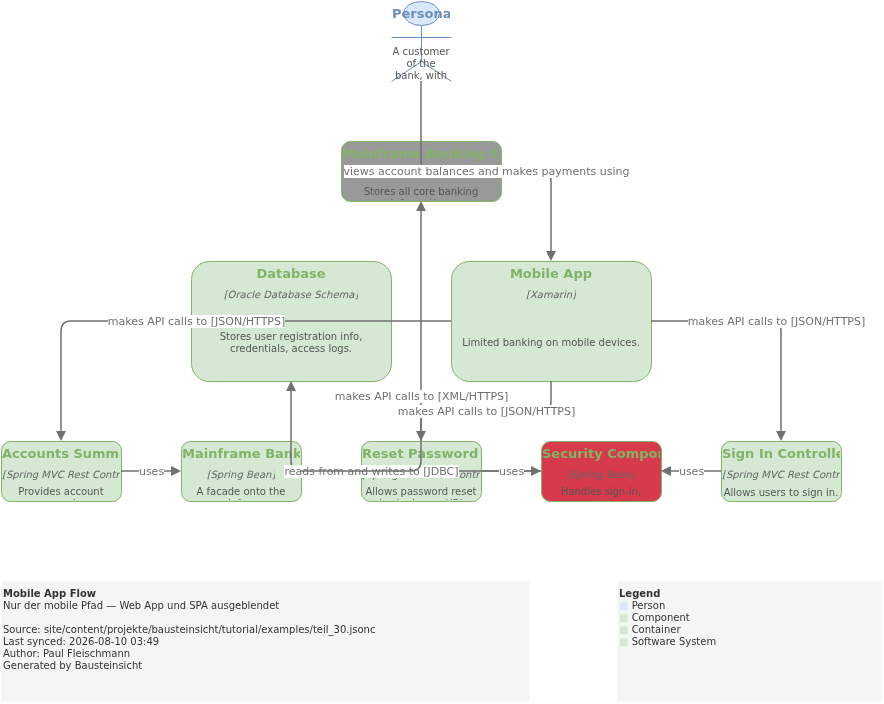
Web App and SPA are irrelevant for mobile developers.
This view shows the complete path from customer through mobile-app to the relevant components and external systems:
"mobile-flow": {
  "title": "Mobile App Flow",
  "description": "Only the mobile path — Web App and SPA hidden",
  "include": [
    "customer",
    "internet-banking.mobile-app",
    "internet-banking.api-app.sign-in",
    "internet-banking.api-app.accounts-summary",
    "internet-banking.api-app.reset-password",
    "internet-banking.api-app.security",
    "internet-banking.api-app.mainframe-facade",
    "internet-banking.database",
    "mainframe"
  ]
}
|
customer-touchpoints — What the Customer Sees
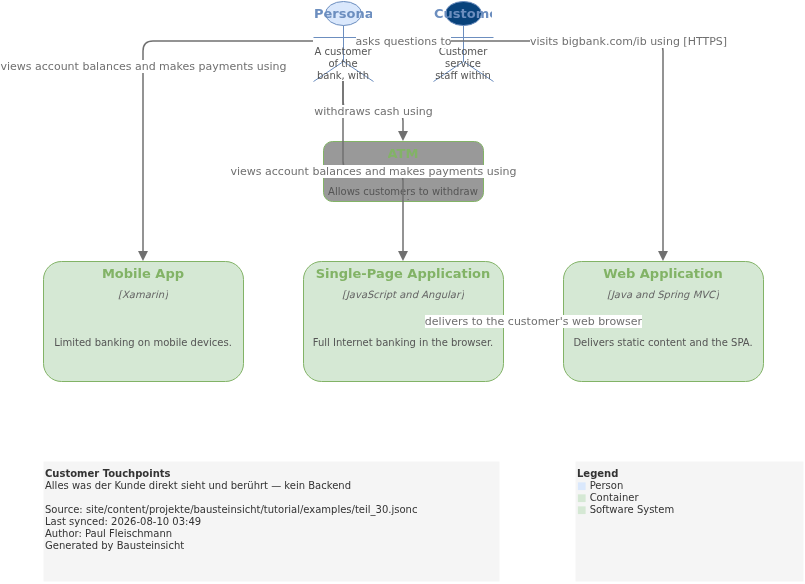
Product owners and UX designers ask: "where does the customer interact with the system?" This view shows exactly that — no backend, no API Application:
"customer-touchpoints": {
  "title": "Customer Touchpoints",
  "description": "Everything the customer directly sees and touches — no backend",
  "include": [
    "customer",
    "internet-banking.web-app",
    "internet-banking.spa",
    "internet-banking.mobile-app",
    "atm",
    "support-staff"
  ]
}
Only 6 shapes. Understandable at a glance — even for non-technical audiences.
security-flow — Auth and Password Reset
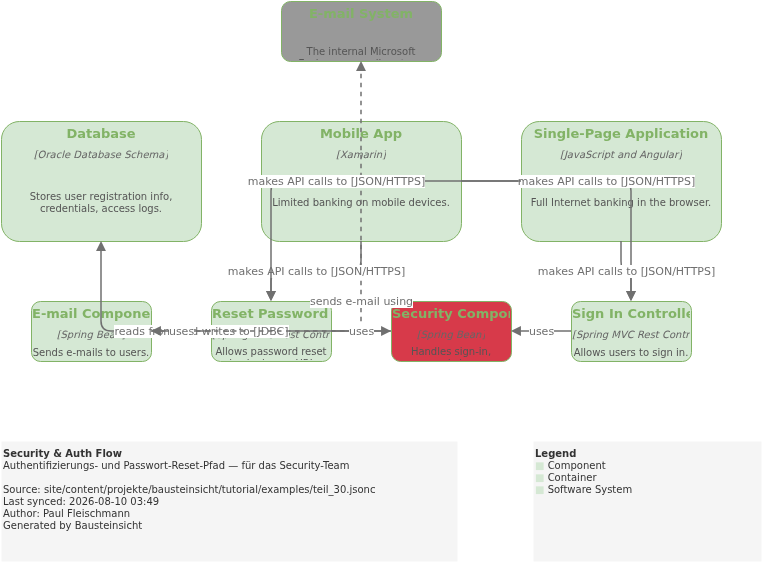
Security reviews need the authentication path in isolation: who calls the Sign-In Controller, where is the database, which component sends emails?
"security-flow": {
  "title": "Security & Auth Flow",
  "description": "Authentication and password reset path — for the security team",
  "include": [
    "internet-banking.spa",
    "internet-banking.mobile-app",
    "internet-banking.api-app.sign-in",
    "internet-banking.api-app.reset-password",
    "internet-banking.api-app.security",
    "internet-banking.api-app.email-component",
    "internet-banking.database",
    "email"
  ]
}
accounts-summary and mainframe-facade are deliberately hidden here — they play no role in the auth flow.
Views and Relationship Lifting
An important property: when a view shows components but not their parent container, Bausteinsicht automatically promotes the relationships.
In the customer-touchpoints view, internet-banking.spa is directly visible.
The relationship customer → internet-banking.spa is drawn directly — not promoted.
In the context view, only internet-banking is visible (no spa).
All relationships from customer to internet-banking.* are collapsed into a single line
customer → internet-banking.
The same model, automatically raised to the right abstraction level — without manual double-definitions.
The Complete teil_30.jsonc
{
  // Teil 30: Mehr Views aus einem Modell — dasselbe Big Bank Modell wie Teil 29,
  // aber mit 7 fokussierten Views statt 3.
  "$schema": "https://raw.githubusercontent.com/docToolchain/Bausteinsicht/main/schemas/bausteinsicht.schema.json",
  "config": {
    "author": "Paul Fleischmann",
    "metadata": true,
    "legend": true
  },
  "specification": {
    "elements": {
      "actor":     { "notation": "Person" },
      "system":    { "notation": "Software System", "container": true },
      "container": { "notation": "Container",        "container": true },
      "component": { "notation": "Component",        "container": true }
    },
    "relationships": {
      "uses":  { "notation": "uses" },
      "sends": { "notation": "sends", "dashed": true }
    },
    "tags": [
      { "id": "external",    "description": "Existing System",     "style": { "fillColor": "#999999", "fontColor": "#ffffff" } },
      { "id": "bank-staff",  "description": "Bankmitarbeiter",     "style": { "fillColor": "#08427b", "fontColor": "#ffffff" } },
      { "id": "web-browser", "description": "Läuft im Browser" },
      { "id": "mobile",      "description": "Läuft auf Mobilgerät" },
      { "id": "database",    "description": "Datenbank" },
      { "id": "security",    "description": "Security-Komponente", "style": { "fillColor": "#d73a4a", "fontColor": "#ffffff" } }
    ]
  },
  "model": {
    "customer":       { "kind": "actor",  "title": "Personal Banking Customer",  "description": "A customer of the bank, with personal bank accounts." },
    "support-staff":  { "kind": "actor",  "title": "Customer Service Staff",     "description": "Customer service staff within the bank.", "tags": ["bank-staff"] },
    "backoffice":     { "kind": "actor",  "title": "Back Office Staff",           "description": "Administration and support staff within the bank.", "tags": ["bank-staff"] },

    "mainframe":      { "kind": "system", "title": "Mainframe Banking System",   "description": "Stores all core banking information.", "tags": ["external"] },
    "email":          { "kind": "system", "title": "E-mail System",              "description": "The internal Microsoft Exchange e-mail system.", "tags": ["external"] },
    "atm":            { "kind": "system", "title": "ATM",                        "description": "Allows customers to withdraw cash.", "tags": ["external"] },

    "internet-banking": {
      "kind": "system", "title": "Internet Banking System",
      "description": "Allows customers to view information about their bank accounts, and make payments.",
      "status": "deployed",
      "children": {
        "web-app":    { "kind": "container", "title": "Web Application",          "technology": "Java and Spring MVC",      "description": "Delivers static content and the SPA.", "status": "deployed" },
        "spa":        { "kind": "container", "title": "Single-Page Application",  "technology": "JavaScript and Angular",   "description": "Full Internet banking in the browser.", "status": "deployed", "tags": ["web-browser"] },
        "mobile-app": { "kind": "container", "title": "Mobile App",               "technology": "Xamarin",                  "description": "Limited banking on mobile devices.", "status": "deployed", "tags": ["mobile"] },
        "api-app": {
          "kind": "container", "title": "API Application", "technology": "Java and Spring MVC",
          "description": "Provides Internet banking functionality via JSON/HTTPS API.",
          "status": "deployed",
          "children": {
            "sign-in":        { "kind": "component", "title": "Sign In Controller",              "technology": "Spring MVC Rest Controller", "description": "Allows users to sign in." },
            "accounts-summary":{ "kind": "component", "title": "Accounts Summary Controller",    "technology": "Spring MVC Rest Controller", "description": "Provides account summaries." },
            "reset-password": { "kind": "component", "title": "Reset Password Controller",      "technology": "Spring MVC Rest Controller", "description": "Allows password reset via single-use URL." },
            "security":       { "kind": "component", "title": "Security Component",             "technology": "Spring Bean",               "description": "Handles sign-in, password changes.", "tags": ["security"] },
            "mainframe-facade":{ "kind": "component", "title": "Mainframe Banking System Facade","technology": "Spring Bean",               "description": "A facade onto the mainframe." },
            "email-component":{ "kind": "component", "title": "E-mail Component",              "technology": "Spring Bean",               "description": "Sends e-mails to users." }
          }
        },
        "database": { "kind": "container", "title": "Database", "technology": "Oracle Database Schema", "description": "Stores user registration info, credentials, access logs.", "status": "deployed", "tags": ["database"] }
      }
    }
  },

  "relationships": [
    { "from": "customer",       "to": "internet-banking",         "label": "views account balances, and makes payments using", "kind": "uses" },
    { "from": "customer",       "to": "support-staff",            "label": "asks questions to",                               "kind": "uses" },
    { "from": "customer",       "to": "atm",                      "label": "withdraws cash using",                            "kind": "uses" },
    { "from": "support-staff",  "to": "mainframe",                "label": "uses",                                            "kind": "uses" },
    { "from": "backoffice",     "to": "mainframe",                "label": "uses",                                            "kind": "uses" },
    { "from": "atm",            "to": "mainframe",                "label": "uses",                                            "kind": "uses" },
    { "from": "internet-banking","to": "mainframe",               "label": "gets account information from, and makes payments using", "kind": "uses" },
    { "from": "internet-banking","to": "email",                   "label": "sends e-mail using",                              "kind": "sends" },
    { "from": "email",          "to": "customer",                 "label": "sends e-mails to",                                "kind": "sends" },

    { "from": "customer",                    "to": "internet-banking.web-app",    "label": "visits bigbank.com/ib using [HTTPS]",             "kind": "uses" },
    { "from": "customer",                    "to": "internet-banking.spa",        "label": "views account balances and makes payments using",  "kind": "uses" },
    { "from": "customer",                    "to": "internet-banking.mobile-app", "label": "views account balances and makes payments using",  "kind": "uses" },
    { "from": "internet-banking.web-app",    "to": "internet-banking.spa",        "label": "delivers to the customer's web browser",          "kind": "uses" },

    { "from": "internet-banking.spa",        "to": "internet-banking.api-app.sign-in",         "label": "makes API calls to [JSON/HTTPS]", "kind": "uses" },
    { "from": "internet-banking.spa",        "to": "internet-banking.api-app.accounts-summary","label": "makes API calls to [JSON/HTTPS]", "kind": "uses" },
    { "from": "internet-banking.spa",        "to": "internet-banking.api-app.reset-password",  "label": "makes API calls to [JSON/HTTPS]", "kind": "uses" },
    { "from": "internet-banking.mobile-app", "to": "internet-banking.api-app.sign-in",         "label": "makes API calls to [JSON/HTTPS]", "kind": "uses" },
    { "from": "internet-banking.mobile-app", "to": "internet-banking.api-app.accounts-summary","label": "makes API calls to [JSON/HTTPS]", "kind": "uses" },
    { "from": "internet-banking.mobile-app", "to": "internet-banking.api-app.reset-password",  "label": "makes API calls to [JSON/HTTPS]", "kind": "uses" },

    { "from": "internet-banking.api-app.sign-in",         "to": "internet-banking.api-app.security",         "label": "uses", "kind": "uses" },
    { "from": "internet-banking.api-app.accounts-summary","to": "internet-banking.api-app.mainframe-facade",  "label": "uses", "kind": "uses" },
    { "from": "internet-banking.api-app.reset-password",  "to": "internet-banking.api-app.security",         "label": "uses", "kind": "uses" },
    { "from": "internet-banking.api-app.reset-password",  "to": "internet-banking.api-app.email-component",  "label": "uses", "kind": "uses" },
    { "from": "internet-banking.api-app.security",        "to": "internet-banking.database",                 "label": "reads from and writes to [JDBC]",  "kind": "uses" },
    { "from": "internet-banking.api-app.mainframe-facade","to": "mainframe",                                 "label": "makes API calls to [XML/HTTPS]",   "kind": "uses" },
    { "from": "internet-banking.api-app.email-component", "to": "email",                                     "label": "sends e-mail using",               "kind": "sends" }
  ],

  "views": {
    // ── Die 3 Standard-Views aus Teil 29 ────────────────────────────────────

    "context": {
      "title": "System Context",
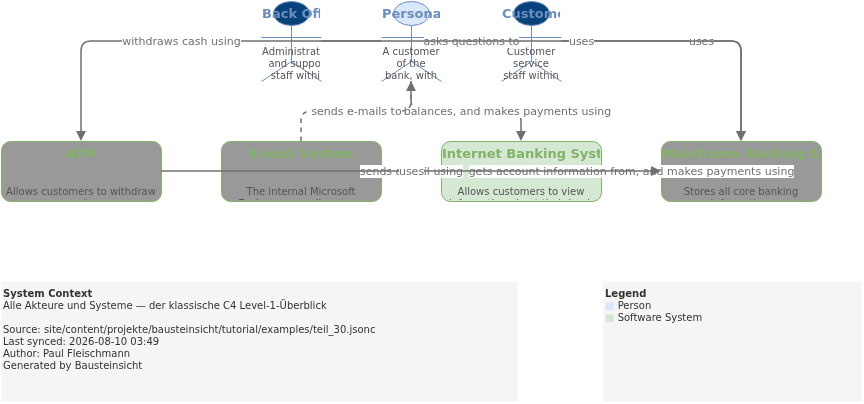
      "description": "Alle Akteure und Systeme — der klassische C4 Level-1-Überblick",
      "include": ["customer", "support-staff", "backoffice", "internet-banking", "mainframe", "email", "atm"]
    },
    "containers": {
      "title": "Container",
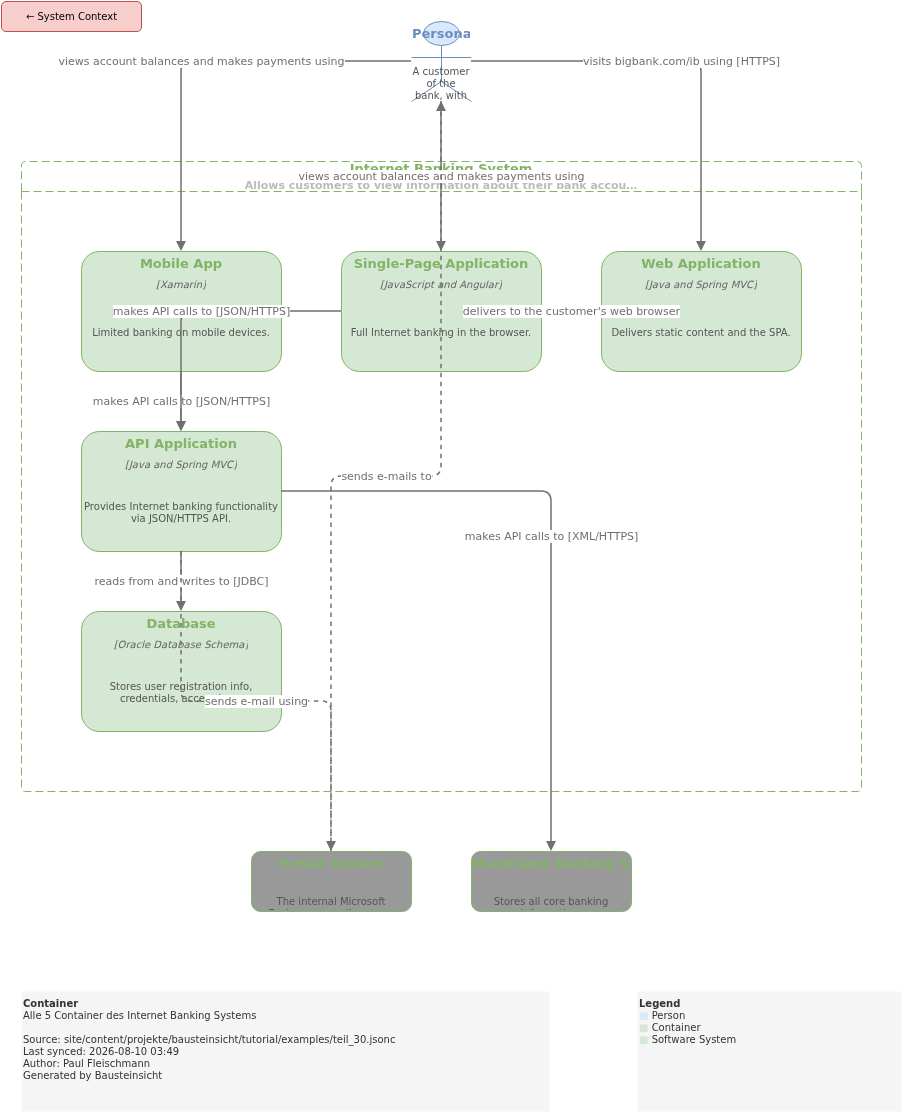
      "description": "Alle 5 Container des Internet Banking Systems",
      "scope": "internet-banking",
      "include": ["customer", "internet-banking.*", "mainframe", "email"]
    },
    "components": {
      "title": "Components (alle)",
      "description": "Alle 6 Komponenten der API Application — volle Übersicht",
      "scope": "internet-banking.api-app",
      "include": [
        "internet-banking.spa", "internet-banking.mobile-app",
        "internet-banking.api-app.*",
        "internet-banking.database", "mainframe", "email"
      ]
    },

    // ── 4 fokussierte Views — das Thema von Teil 30 ──────────────────────────

    "api-internals": {
      "title": "API Internals (Zoom-In)",
      "description": "Nur API App + direkte externe Abhängigkeiten — ohne Frontend-Rauschen",
      "scope": "internet-banking.api-app",
      "include": [
        "internet-banking.api-app.*",
        "internet-banking.database",
        "mainframe",
        "email"
      ]
    },
    "mobile-flow": {
      "title": "Mobile App Flow",
      "description": "Nur der mobile Pfad — Web App und SPA ausgeblendet",
      "include": [
        "customer",
        "internet-banking.mobile-app",
        "internet-banking.api-app.sign-in",
        "internet-banking.api-app.accounts-summary",
        "internet-banking.api-app.reset-password",
        "internet-banking.api-app.security",
        "internet-banking.api-app.mainframe-facade",
        "internet-banking.database",
        "mainframe"
      ]
    },
    "customer-touchpoints": {
      "title": "Customer Touchpoints",
      "description": "Alles was der Kunde direkt sieht und berührt — kein Backend",
      "include": [
        "customer",
        "internet-banking.web-app",
        "internet-banking.spa",
        "internet-banking.mobile-app",
        "atm",
        "support-staff"
      ]
    },
    "security-flow": {
      "title": "Security & Auth Flow",
      "description": "Authentifizierungs- und Passwort-Reset-Pfad — für das Security-Team",
      "include": [
        "internet-banking.spa",
        "internet-banking.mobile-app",
        "internet-banking.api-app.sign-in",
        "internet-banking.api-app.reset-password",
        "internet-banking.api-app.security",
        "internet-banking.api-app.email-component",
        "internet-banking.database",
        "email"
      ]
    }
  }
}
Result: 7 Tabs in draw.io
bausteinsicht sync generates 7 draw.io tabs:
| Tab | Title | Audience |
|---|---|---|
| System Context | Management, Stakeholders |
| Container | Architects |
| Components (all) | All Developers |
| API Internals | Backend Team |
| Mobile App Flow | Mobile Developers |
| Customer Touchpoints | Product Owner, UX |
| Security & Auth Flow | Security Team, Auditors |
You can find the draw.io file here: teil_30.drawio
Generated PNG files:
Generated PlantUML diagrams:
Naming Views: Tab Order in draw.io
The order of views in the JSONC determines the tab order in draw.io. Most useful: from abstract to concrete — just like in C4.
"views": {
  "context":    { ... },   // Tab 1: abstract
  "containers": { ... },   // Tab 2
  "components": { ... },   // Tab 3: concrete
  "api-internals": { ... } // Tab 4: zoom-in
}
View keys become draw.io tab names. Descriptive keys ( |
What Comes Next
Continue with Part 31: Clickable Links in Exported Diagrams —
how the link field turns diagrams into an entry point into ADRs, tickets, and Confluence pages.
The most important entry points for quick reference:
Starting fresh? → Part 2: Getting Started
Tags for view filtering? → Part 23: Tags & View Filtering
Performance with large models? → Part 28: Performance
Migrating from Structurizr? → Part 29: Big Bank Import
Official documentation: User Manual · Tutorial on doctoolchain.org