This post builds on Part 30.
Until now, Bausteinsicht diagrams were pure visualization — you could see a system exists, but there
was no way into it. With the link field on elements (docToolchain/Bausteinsicht#483), that changes:
every element can carry a link that lands as a clickable link attribute on the shape during draw.io
export.
That turns a diagram into a real entry point into the surrounding documentation landscape — a jump to an ADR, a Jira ticket, or a Confluence page, straight from the shape.
Not to be confused with the ADR registry from Part 11
( |
The link Field on the Model
Any element can optionally get a link field:
"api": {
  "kind": "container", "title": "REST API", "technology": "Go",
  "link": "examples/teil_31_adr.html"
}
On the next bausteinsicht sync, this value lands as the link attribute on the <object> in the
draw.io XML — in the diagram, the shape becomes directly clickable and opens the link in the browser.
An ADR as a Standalone Page
Instead of linking to some external URL, this example shows something more tangible: a self-written Architecture Decision Record, built to HTML with Asciidoctor and embedded directly in this tutorial post.
The ADR describes exactly the rule demonstrated below — why drill-down links take priority over user-defined links:
asciidoctor examples/teil_31_adr.adoc -o examples/teil_31_adr.htmlThe content pipeline (infra/builder/build-adr-html.sh) handles this automatically on every build —
analogous to the existing draw.io sync step. Every examples/*_adr.adoc file is built to HTML and
served as a static asset.
Embedded, it looks like this:
No page change needed — the linked ADR is readable right here, exactly as it would appear when
clicking the api shape in the diagram.
Priority Rule: Drill-Down Beats User Link (ADR-009)
What happens when an element is both the scope of a detail view (which automatically gets a
drill-down link) and carries a user-defined link? Both would claim the same shape.
| Situation | Result |
|---|---|
Only a user-defined | Link is preserved, points to the given URL |
Only drill-down (element is | Automatic link to the detail view ( |
Both at once | Drill-down wins — the user-defined link is discarded, |
The reasoning is in the embedded ADR above — in short: drill-down is navigation within the diagram series and is expected to take precedence over a jump to the outside.
The Example Model
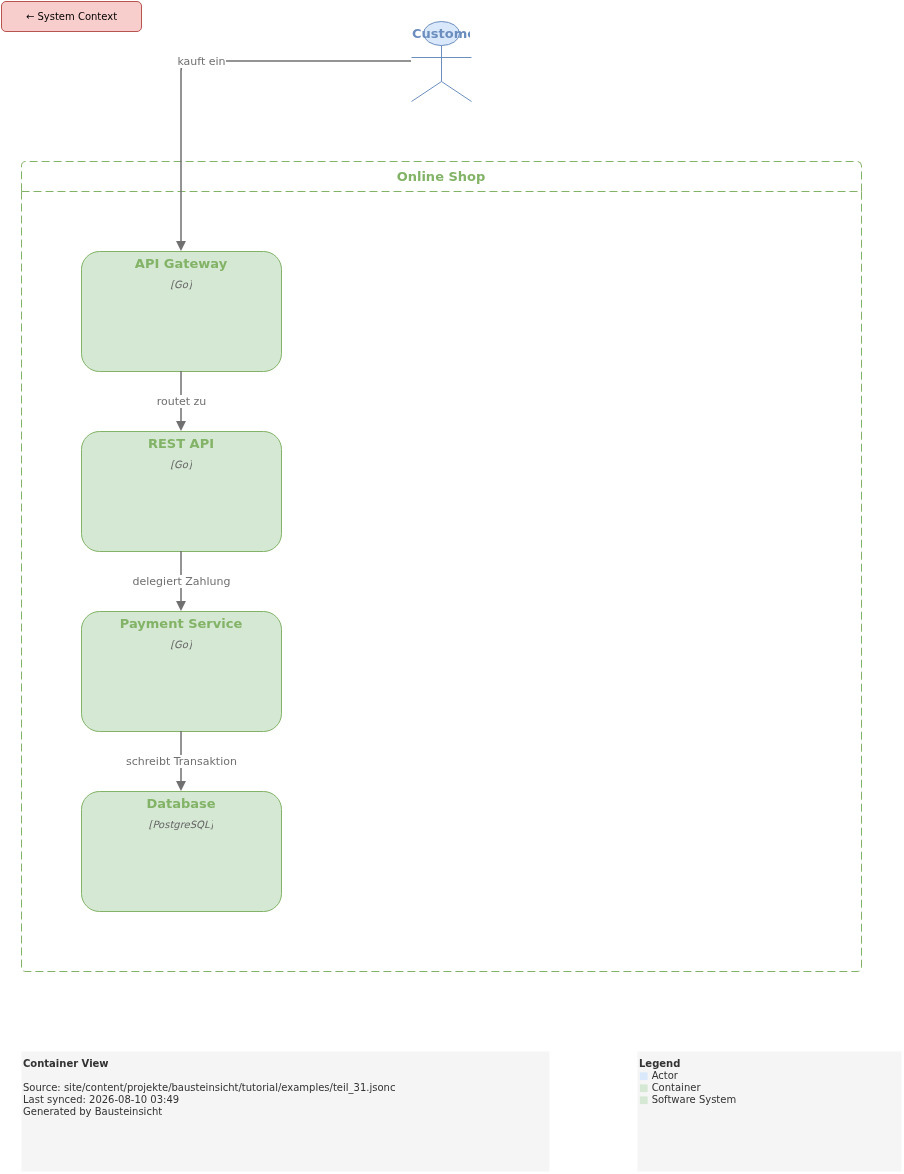
teil_31.jsonc models a small online shop with four elements that show four different link use cases:
onlineshop.gateway—linkto an external GitHub issue (docToolchain/Bausteinsicht#483, the ticket that introduced this feature). No conflict, the link survives the export.onlineshop.api—linkto a whole page,examples/teil_31_adr.html. No conflict, the link survives the export.onlineshop.payment— isscopeof thepayment-detailsview and has alink. Here the priority rule kicks in: the drill-down link wins, andsyncprints a warning.onlineshop.db—linkwith an anchor on an absolute URL,https://paul-fleischmann.com/projekte/bausteinsicht/tutorial/examples/teil_31_adr.html#_modellelement_database_postgresql, jumps straight to the section describing the Database component instead of the top of the page.
{
  // Teil 31: Klickbare Links in exportierten Diagrammen — Online Shop Beispiel
  "specification": {
    "elements": {
      "actor":     { "notation": "Actor" },
      "system":    { "notation": "Software System", "container": true },
      "container": { "notation": "Container",        "container": true }
    },
    "relationships": {
      "uses": { "notation": "uses" }
    }
  },
  "model": {
    "customer": { "kind": "actor", "title": "Customer" },
    "onlineshop": {
      "kind": "system", "title": "Online Shop",
      "children": {
        // Use Case: externer Ticket-Link — verweist auf das GitHub-Issue,
        // das dieses Feature eingeführt hat. Kein Konflikt, der Link bleibt
        // im Export erhalten.
        "gateway": {
          "kind": "container", "title": "API Gateway", "technology": "Go",
          "link": "https://github.com/docToolchain/bausteinsicht/issues/483"
        },
        // Klarer Fall: user-definierter Link auf eine ganze Seite, kein
        // Konflikt — dieses Element ist nirgends der `scope` einer View,
        // der Link bleibt also im draw.io-Export erhalten wie modelliert.
        "api": {
          "kind": "container", "title": "REST API", "technology": "Go",
          "link": "examples/teil_31_adr.html"
        },
        // Priority-Demo: dieses Element ist gleichzeitig `scope` der
        // "payment-details"-View UND hat einen user-definierten Link.
        // Der Drill-Down-Link gewinnt (ADR-009) — sync gibt eine Warnung aus.
        "payment": {
          "kind": "container", "title": "Payment Service", "technology": "Go",
          "link": "examples/teil_31_adr.html#_entscheidung"
        },
        // Use Case: Deep-Link mit Anchor — verweist nicht nur auf die Seite,
        // sondern direkt auf den Abschnitt, der diese Komponente beschreibt.
        // Anders als beim `api`-Element ist der Link hier absolut (volle
        // Produktions-URL): beim Inline-SVG-Export (siehe unten) überlebt
        // nur eine absolute URL unverändert — ein relativer Link würde gegen
        // den internen Pfad der draw.io-CLI aufgelöst und liefe ins Leere.
        "db": {
          "kind": "container", "title": "Database", "technology": "PostgreSQL",
          "link": "https://paul-fleischmann.com/projekte/bausteinsicht/tutorial/examples/teil_31_adr.html#_modellelement_database_postgresql"
        }
      }
    }
  },
  "relationships": [
    { "from": "customer",              "to": "onlineshop.gateway", "label": "kauft ein",            "kind": "uses" },
    { "from": "onlineshop.gateway",     "to": "onlineshop.api",     "label": "routet zu",             "kind": "uses" },
    { "from": "onlineshop.api",         "to": "onlineshop.payment", "label": "delegiert Zahlung",     "kind": "uses" },
    { "from": "onlineshop.payment",     "to": "onlineshop.db",      "label": "schreibt Transaktion",  "kind": "uses" }
  ],
  "views": {
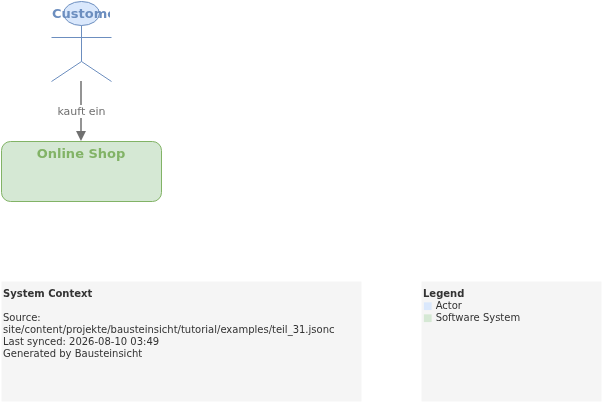
    "context":    { "title": "System Context", "include": ["customer", "onlineshop"] },
    "containers": { "title": "Container View", "scope": "onlineshop", "include": ["customer", "onlineshop.*"] },
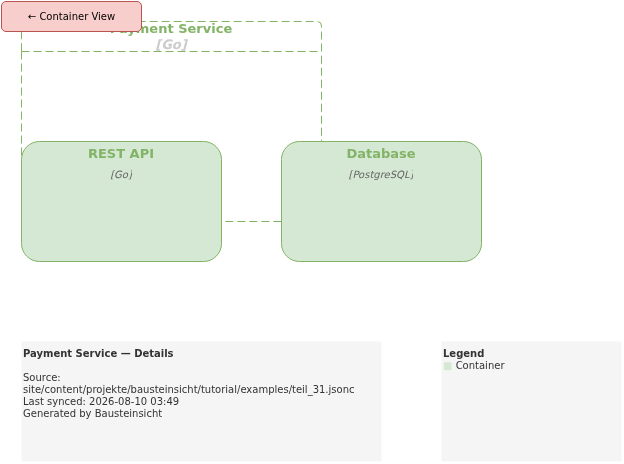
    "payment-details": {
      "title": "Payment Service — Details",
      "scope": "onlineshop.payment",
      "include": ["onlineshop.api", "onlineshop.payment", "onlineshop.db"]
    }
  }
}
Running bausteinsicht sync
bausteinsicht sync --model teil_31.jsoncThe output shows the priority warning for onlineshop.payment:
WARNING: element onlineshop.payment: user-defined link overridden by drill-down link (ADR-009)
Forward (model → draw.io): 14 added, 0 updated, 0 deleted
The resulting draw.io XML shows the difference between all four cases directly:
<!-- onlineshop.gateway — external ticket link survives -->
<object label="API Gateway" link="https://github.com/docToolchain/bausteinsicht/issues/483" ...>

<!-- onlineshop.api — user-defined page link survives -->
<object label="REST API" link="examples/teil_31_adr.html" ...>

<!-- onlineshop.payment — drill-down wins, user link was discarded -->
<object label="Payment Service" link="data:page/id,view-payment-details" ...>

<!-- onlineshop.db — deep link with anchor, absolute URL survives -->
<object label="Database" link="https://paul-fleischmann.com/projekte/bausteinsicht/tutorial/examples/teil_31_adr.html#_modellelement_database_postgresql" ...>
Result in the Diagram
You can find the draw.io file here: teil_31.drawio
In the draw.io viewer, all four shapes are clickable, but each with a different target:
API Gatewayopens the GitHub issue in a new tab.REST APIopens the embedded ADR — the same page shown further up.Payment Serviceinstead jumps to thepayment-detailsview — drill-down navigation stays intact even though alinkfield is also set in the model.Databaseopens the same ADR asREST API, but scrolled straight to the section describing the Database component instead of the top of the page.
Generated PNG files:
Generated PlantUML diagrams:
A Directly Embedded SVG With Real Links
The interactive viewer.diagrams.net iframe above loads the raw .drawio XML at runtime in the
browser — that only works if the file is publicly reachable at the given URL. There’s an alternative
that needs no external service and no network round trip at all: bausteinsicht export --image-format
svg uses the real draw.io CLI (not Kroki), and it preserves link attributes as real <a xlink:href>
elements in the SVG. Embedded as inline markup directly in the HTML — not as <img src="…svg">,
which would swallow the links — individual shapes in it are genuinely clickable, with no JavaScript
and no external service.
The content pipeline (infra/builder/generate-drawio-svg-inline.sh) generates this on every build:
bausteinsicht export --image-format svg --output out/For the Container View, the embedded result looks like this:
Two limitations compared to the interactive viewer:
Only absolute URLs work — anchors included.
API Gateway(https://github.com/…;) is correctly clickable, and so isDatabase(https://paul-fleischmann.com/…teil_31_adr.html#_modellelement_database_postgresql) — the click lands right in the section describing the Database component.REST API, on the other hand, has a relative link (examples/teil_31_adr.html, no domain) — the draw.io CLI resolves that during export against its own install directory, not against the page the SVG will later be embedded in:<a xlink:href="file:///opt/drawio/resources/app.asar/drawio/src/main/webapp/examples/teil_31_adr.html">In the browser, that click goes nowhere. For relative links to work here, they’d need to be modeled as absolute URLs — with or without an anchor, that part doesn’t matter as long as the domain is there.
Drill-down links are lost entirely. In the interactive viewer,
Payment Servicehas a clickable jump to thepayment-detailsview (data:page/id,…). That internal URL scheme isn’t navigable in a browser, so the draw.io CLI leaves the shape without an<a>wrapper altogether during SVG export. Multi-page navigation between views only works in the interactive iframe.
So this approach only pays off when every relevant link is an absolute URL and no drill-down navigation is needed — for example, a single, self-contained diagram with external ticket or doc links.
When Is the link Field Worth Using?
| Situation | Recommendation | Example above |
|---|---|---|
Element has an associated ADR |
|
|
Element is the subject of an open ticket |
|
|
Only one specific section of a page is relevant |
|
|
Element has extensive documentation in Confluence |
| — |
Element is | Don’t set |
|
What Comes Next
This closes another chapter of the Bausteinsicht tutorial series: from pure visualization (Part 1) to diagrams that link directly into the rest of the documentation landscape.
The most important entry points for quick reference:
Starting fresh? → Part 2: Getting Started
ADRs as a registry in the model? → Part 11: ADR Integration
Multiple views from one model? → Part 30: Multi-View Design
Migrating from Structurizr? → Part 29: Big Bank Import
Official documentation: User Manual · Tutorial on doctoolchain.org