This post continues from the fifth part. The Bausteinsicht model is the single source of truth — and from it, many different output formats can be generated. This post shows all available export commands.
Overview: The Four Export Commands
| Command | Purpose |
|---|---|
| PNG or SVG via draw.io CLI (visual output) |
| Text diagrams: PlantUML, Mermaid, DOT, D2, HTML5, Structurizr DSL |
| Sequence diagrams from |
| Element tables as AsciiDoc or Markdown |
export: PNG and SVG
bausteinsicht export calls the draw.io CLI headlessly and renders each view as an image file.
# Export all views as PNG (default format)
bausteinsicht export --output docs/images/

# Export only a specific view
bausteinsicht export --view containers --output docs/images/

# SVG instead of PNG (better for print and web)
bausteinsicht export --image-format svg --output docs/images/

# Retina resolution for print (2x)
bausteinsicht export --image-format png --scale 2.0 --output docs/images/

# With embedded draw.io XML (for further editing)
bausteinsicht export --embed-diagram --output docs/images/
Output:
Exported: docs/images/context.png
Exported: docs/images/containers.png
Exported: docs/images/api-components.png
export requires the draw.io Desktop application on the system. Bausteinsicht detects the path automatically. On CI systems, draw.io can be run headlessly as a Docker container. |
export-diagram: Text-Based Diagrams
bausteinsicht export-diagram generates text-based diagram formats directly from the JSONC model — without draw.io.
PlantUML
bausteinsicht export-diagram --diagram-format plantuml --output docs/diagrams/
# → docs/diagrams/context.puml, containers.puml, ...

# Single view to stdout
bausteinsicht export-diagram --diagram-format plantuml --view context
Example output (C4 context diagram):
Mermaid
bausteinsicht export-diagram --diagram-format mermaid --output docs/diagrams/
# → docs/diagrams/context.mmd, containers.mmd, ...
Mermaid diagrams can be embedded directly in GitHub Markdown:
```mermaid
C4Context
  Person(customer, "Customer")
  System(shop, "Online Shop")
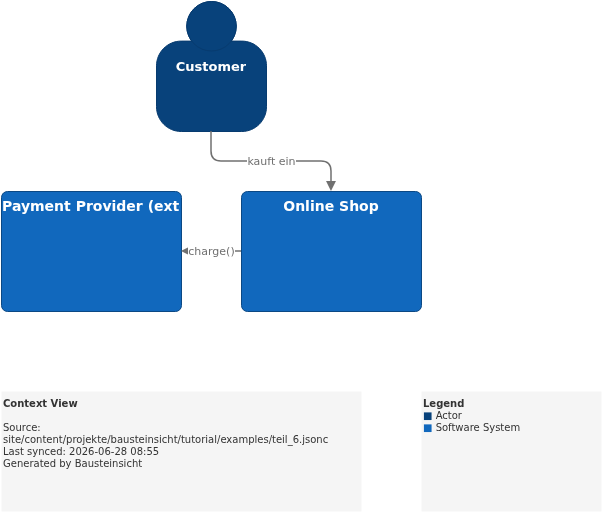
  Rel(customer, shop, "kauft ein")
```
DOT (Graphviz)
bausteinsicht export-diagram --diagram-format dot --output docs/diagrams/
# → docs/diagrams/architecture-context.dot

# Directly to PNG via Graphviz
bausteinsicht export-diagram --diagram-format dot --view context | dot -Tpng -o context.png
D2
bausteinsicht export-diagram --diagram-format d2 --output docs/diagrams/
# → docs/diagrams/architecture-context.d2
HTML5 Viewer
The HTML export produces an interactive standalone HTML page:
bausteinsicht export-diagram --diagram-format html --output docs/
# → docs/context.html, docs/containers.html, ...
The HTML pages can be opened without a server — ideal for documentation reviews without a build pipeline.
Structurizr DSL
The Structurizr export produces a complete workspace.dsl file:
bausteinsicht export-diagram --diagram-format structurizr --output docs/
# → docs/workspace.dsl
--view is not supported for the Structurizr format — it always exports the entire workspace. |
JSON Output for CI Pipelines
All export-diagram formats support --format json for structured output in CI pipelines:
bausteinsicht export-diagram --diagram-format mermaid --format jsonOutput:
[
  { "view": "context",    "format": "mermaid", "source": "C4Context\n..." },
  { "view": "containers", "format": "mermaid", "source": "C4Container\n..." }
]
export-sequence: Sequence Diagrams
bausteinsicht export-sequence exports dynamicViews from the model as sequence diagrams.
# PlantUML (default)
bausteinsicht export-sequence --output docs/diagrams/
# → docs/diagrams/sequence-checkout.puml

# Mermaid
bausteinsicht export-sequence --diagram-format mermaid --output docs/diagrams/
# → docs/diagrams/sequence-checkout.md

# Single dynamic view
bausteinsicht export-sequence --view checkout --diagram-format plantuml
For the checkout example from Part 3:
This is what the result looks like in draw.io (bausteinsicht sync):
You can find the draw.io file here: teil_6.drawio
export-table: Element Tables
bausteinsicht export-table exports the elements of a view as a structured table — useful for documentation and compliance reviews.
# AsciiDoc table (default) for all views
bausteinsicht export-table --output docs/

# Single view only
bausteinsicht export-table --view containers --table-format adoc --output docs/

# Markdown table
bausteinsicht export-table --table-format md --output docs/

# All elements deduplicated across all views
bausteinsicht export-table --combined --output docs/
# → docs/elements.adoc
Example output (AsciiDoc):
[cols="1,1,1,2", options="header"]
|===
| Element | Kind | Technology | Description
| Web Frontend | container | React |
| REST API | container | Go |
| PostgreSQL | database | PostgreSQL |
| Redis Cache | database | Redis |
|===
For --format json:
bausteinsicht export-table --view containers --format jsonOutput:
[
  { "element": "shop.frontend", "title": "Web Frontend", "kind": "container", "technology": "React", "description": "" },
  { "element": "shop.api",      "title": "REST API",     "kind": "container", "technology": "Go",    "description": "" }
]
Import: From Structurizr and LikeC4
In addition to export, Bausteinsicht also supports importing from other formats:
# Import Structurizr DSL
bausteinsicht import --from structurizr workspace.dsl --output architecture.jsonc

# Import LikeC4 DSL
bausteinsicht import --from likec4 architecture.c4 --output architecture.jsonc

# Preview without writing
bausteinsicht import --from structurizr workspace.dsl --dry-run

# Overwrite existing file
bausteinsicht import --from likec4 architecture.c4 --force
This is the migration path for existing projects: import once, then continue working with Bausteinsicht.
When to Use Which Export?
| Scenario | Recommendation | Command |
|---|---|---|
Documentation in Confluence or AsciiDoc | Embed PNG/SVG |
|
GitHub README or PR description | Embed Mermaid directly |
|
Team without draw.io wants to review diagrams | Distribute HTML5 viewer |
|
Migration to Structurizr or LikeC4 | Export DSL |
|
Architecture review with stakeholders | PDF via PlantUML or PNG |
|
CI pipeline, automated documentation | Process JSON output |
|
Compliance documentation | AsciiDoc table |
|
Example Model
The base model for all export commands in this part is located at teil_6.jsonc.
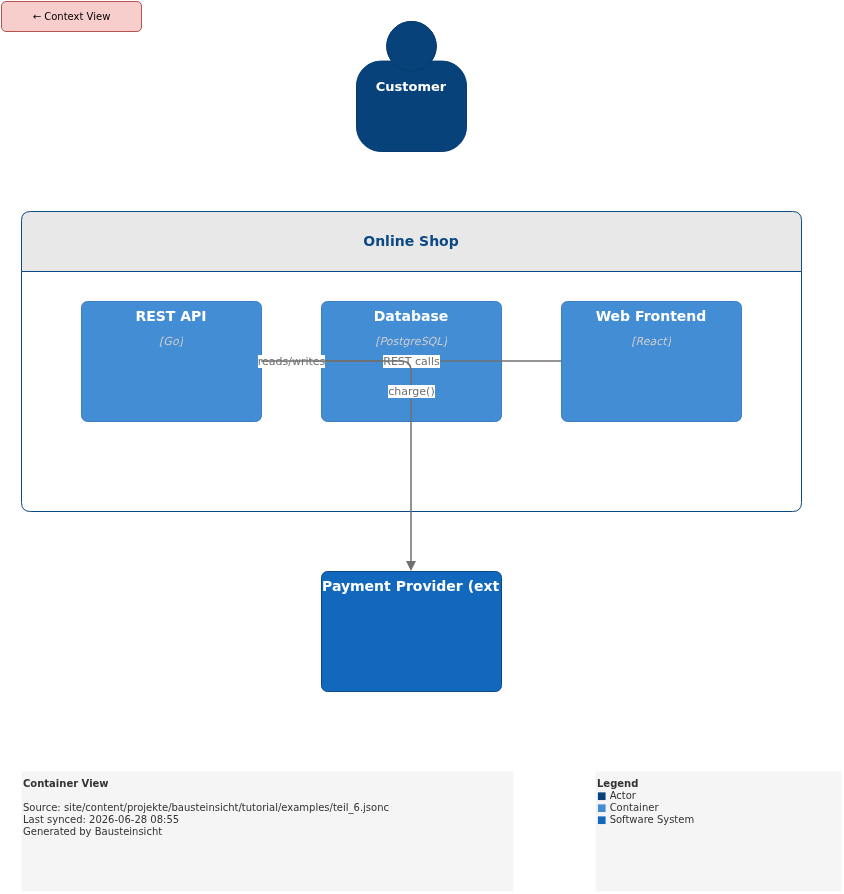
Generated PNG files via bausteinsicht export --image-format png:
Generated PlantUML diagrams via bausteinsicht export-diagram:
What Comes Next
Part 7: Snapshots & Changelog — Version architecture over time
Part 8: Validation & Linting — Enforce architecture rules with
bausteinsicht lint
Official documentation: User Manual · Tutorial on doctoolchain.org