This post continues from the seventeenth part.
The model can be edited not only manually in architecture.jsonc — all structural changes can also be made via the CLI.
This is particularly useful for scripts, LLM workflows (→ Part 10), and CI pipelines.
bausteinsicht add element
Add a new element to the model:
# Top-level element
bausteinsicht add element \
  --id paymentservice \
  --kind service \
  --title "Payment Service" \
  --technology "Go" \
  --description "Processes payments"

# Nested element (child of paymentservice)
bausteinsicht add element \
  --id ledger \
  --kind database \
  --title "Payment Ledger" \
  --technology "PostgreSQL" \
  --parent paymentservice
Validations:
* --id may only contain letters, digits, hyphens, and underscores (no dots — dots are hierarchy separators)
* --kind must be defined in specification.elements
* Parent must exist and have container: true in its specification
* Duplicates are rejected
JSON output:
bausteinsicht add element --id newservice --kind service --title "New Service" --format json
# → {"id": "newservice", "kind": "service", "title": "New Service"}
bausteinsicht add relationship
Add a relationship between two existing elements:
bausteinsicht add relationship \
  --from shop.api \
  --to paymentservice \
  --label "charge(amount)" \
  --kind rest \
  --description "Initiates payment"
Validations:
* --from and --to must exist in the model
* --kind must be defined in specification.relationships (if provided)
* Duplicates (same from/to/kind combination) are rejected
bausteinsicht add view
Create a new view or extend an existing view with elements:
# New view with scope
bausteinsicht add view payment-view \
  --title "Payment System" \
  --scope paymentservice \
  --include "paymentservice.*"

# Extend existing view with an element
bausteinsicht add view payment-view \
  --include shop.api
--include accepts element IDs and wildcards like paymentservice.* (all direct children).
bausteinsicht add-from-pattern
Patterns are reusable element topologies defined in specification.patterns.
They are instantiated with add-from-pattern:
# Instantiate the "microservice" pattern with ID "notificationservice"
bausteinsicht add-from-pattern microservice \
  --id notificationservice \
  --title "Notification Service"

# With namespace prefix
bausteinsicht add-from-pattern microservice \
  --id emailworker \
  --prefix notification
# → creates "notification-emailworker" as the top-level ID
The pattern expands all defined elements and relationships at once.
Listing Patterns
bausteinsicht add pattern listLists all patterns defined in specification.patterns with their element and relationship counts.
bausteinsicht add specification
Add new types to the specification:
# Define a new element type
bausteinsicht add specification element \
  --kind "cache" \
  --notation "Cylinder" \
  --description "In-Memory Cache"

# Define a new relationship type
bausteinsicht add specification relationship \
  --kind "event" \
  --notation "Event" \
  --dashed
Comments Are Preserved
All add commands use a comment-preserving patcher: JSONC comments in architecture.jsonc are not removed.
New entries are inserted precisely at the correct location — without destroying the existing formatting.
If the patch fails (e.g., due to complex formatting), Bausteinsicht falls back to a full save — the content will then be correct, but comments may be lost.
After each add command, running bausteinsicht sync is recommended so the new element appears in the draw.io diagram. |
Typical CLI Workflow
# 1. Add new element
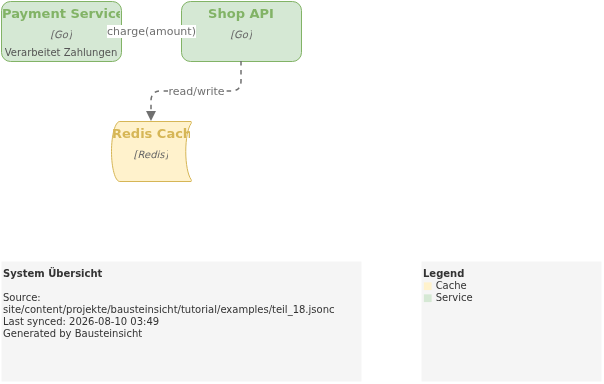
bausteinsicht add element --id cacheservice --kind cache --title "Redis Cache" --technology Redis

# 2. Add relationship
bausteinsicht add relationship --from shop.api --to cacheservice --label "read/write" --kind tcp

# 3. Include in existing view
bausteinsicht add view system-overview --include cacheservice

# 4. Sync: update draw.io
bausteinsicht sync

# 5. Validate
bausteinsicht validate
Example Model
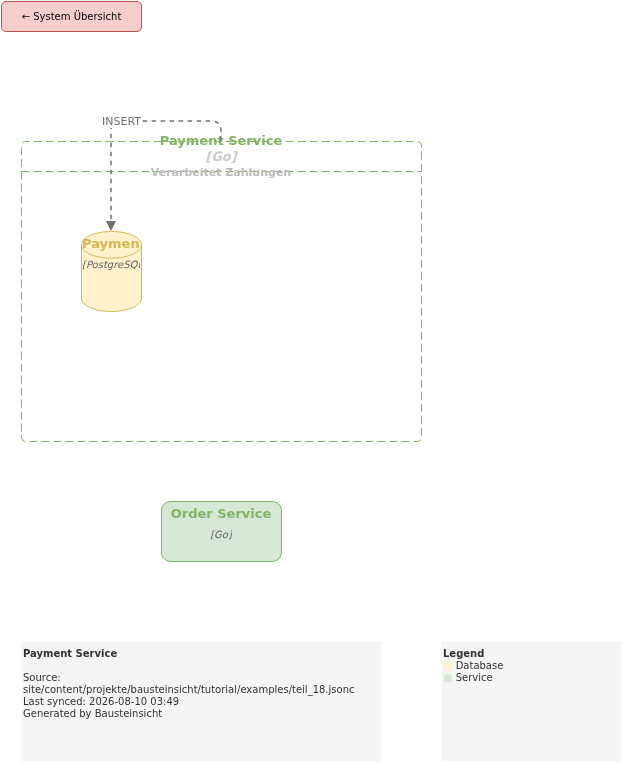
The example for this part (model built incrementally via CLI) is located at teil_18.jsonc.
This is what the result looks like in draw.io (bausteinsicht sync):
You can find the draw.io file here: teil_18.drawio
Generated PNG files via bausteinsicht export --image-format png:
Generated PlantUML diagrams via bausteinsicht export-diagram:
What Comes Next
Part 19: Health Score — Objectively measure architecture quality and rate it with A–F grades
Part 20: Element Lifecycle — Track element status from proposed to archived in the model
Official documentation: User Manual · Tutorial on doctoolchain.org