This post continues from the twentieth part. Architecture migrations are complex: you need to understand where you currently stand (As-Is) and where you want to go (To-Be). Bausteinsicht supports this directly in the model — as two parallel snapshots.
The Concept
architecture.jsonc can contain two optional sections alongside the main model:
asIs— current state (as-is architecture)toBe— target state (to-be architecture)
Both have the same structure: elements and relationships.
{
  "model": { ... },

  "asIs": {
    "elements": {
      "shop-monolith": {
        "kind": "system",
        "title": "Shop Monolith",
        "technology": "Java/Spring"
      },
      "shop-db": {
        "kind": "database",
        "title": "Monolith DB",
        "technology": "MySQL"
      }
    },
    "relationships": [
      { "from": "shop-monolith", "to": "shop-db", "label": "reads/writes" }
    ]
  },

  "toBe": {
    "elements": {
      "shop-api": {
        "kind": "service",
        "title": "Shop API",
        "technology": "Go"
      },
      "auth-service": {
        "kind": "service",
        "title": "Auth Service",
        "technology": "Go"
      },
      "payment-service": {
        "kind": "service",
        "title": "Payment Service",
        "technology": "Rust"
      },
      "shop-db": {
        "kind": "database",
        "title": "Shop DB",
        "technology": "PostgreSQL"
      }
    },
    "relationships": [
      { "from": "shop-api",      "to": "auth-service",     "label": "authenticate" },
      { "from": "shop-api",      "to": "payment-service",  "label": "charge" },
      { "from": "shop-api",      "to": "shop-db",          "label": "reads/writes" },
      { "from": "payment-service","to": "shop-db",         "label": "audit" }
    ]
  }
}
bausteinsicht diff
diff compares asIs with toBe and outputs the differences:
bausteinsicht diff --model architecture.jsoncOutput:
Architecture Diff
=================

Added (3):
  + shop-api            [service ] "Shop API"
  + auth-service        [service ] "Auth Service"
  + payment-service     [service ] "Rust"

Removed (1):
  - shop-monolith       [system  ] "Shop Monolith"

Changed (1):
  ~ shop-db             [database]
      technology: "MySQL" → "PostgreSQL"

Added Relationships (3):
  + shop-api → auth-service (authenticate)
  + shop-api → payment-service (charge)
  + payment-service → shop-db (audit)

Removed Relationships (1):
  - shop-monolith → shop-db (reads/writes)
JSON Output
bausteinsicht diff --model architecture.jsonc --format jsonReturns a structured DiffResult object with summary (counts) and an elements array containing ChangeAdded, ChangeRemoved, and ChangeChanged entries.
Comparing a Single View
bausteinsicht diff --model architecture.jsonc --view shop-overviewFilters the diff to elements that are visible in the specified view.
Difference from snapshot diff
| Aspect | bausteinsicht diff | bausteinsicht snapshot diff |
|---|---|---|
Compares |
| Two snapshots at different points in time |
Purpose | Migration planning (defining the target) | Retrospective (what has changed?) |
Data storage | In the model itself | In |
Workflow: Migration Planning
Populate
asIswith the current system statePopulate
toBewith the target architecturebausteinsicht diff— shows exactly which steps are requiredDocument the result in a PR description or ADR
After the migration: update
asIsto matchtoBe, cleartoBeor define the next migration stage
# Diff for PR description
bausteinsicht diff --model architecture.jsonc --format json \
  | jq '{ added: .summary.added_elements, removed: .summary.removed_elements, changed: .summary.changed_elements }'
asIs and toBe can also be populated incrementally — for iterative migrations with multiple intermediate states. Update asIs between sprints whenever elements have actually been migrated. |
Example Model
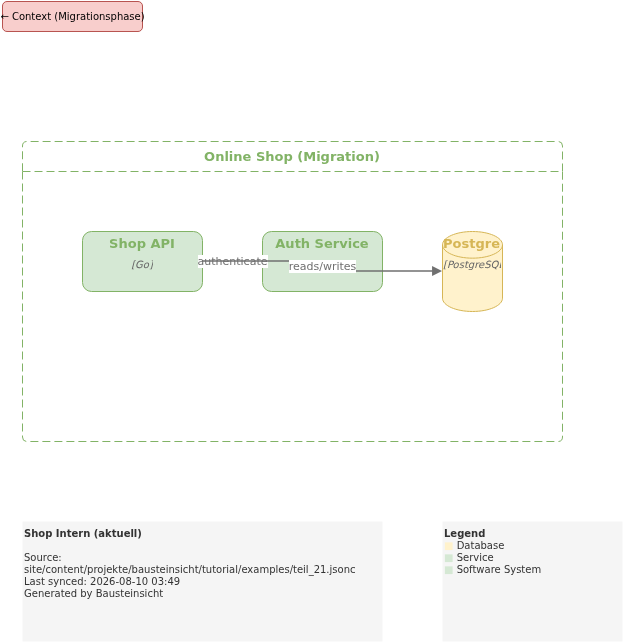
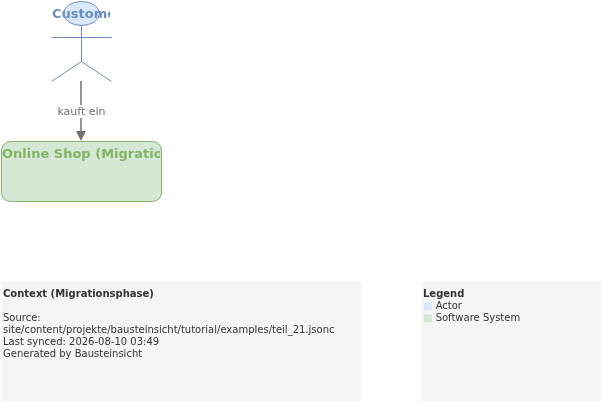
The example for this part (monolith → microservices migration with asIs/toBe sections) is located at teil_21.jsonc.
This is what the result looks like in draw.io (bausteinsicht sync):
The draw.io file for this can be found here: teil_21.drawio
Generated PNG files via bausteinsicht export --image-format png:
Generated PlantUML diagrams via bausteinsicht export-diagram (current migration phase):
What Comes Next
Part 22: find & show — Navigate the model and explore individual elements
Part 23: Tags & View Filtering — Tag elements and filter views precisely
Official documentation: User Manual · Tutorial on doctoolchain.org